
Buick Enclave: Windows. Seat Adjustment. Memory Features
Windows
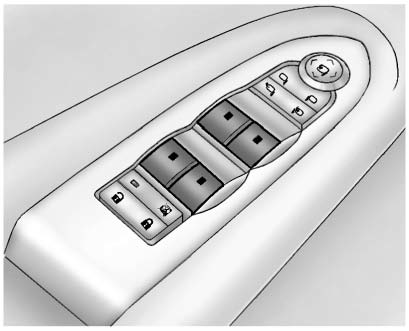
Press the switch down to lower the window. Pull the switch upward to raise it.
For more information, see Power Windows.
Seat Adjustment
Power Seat
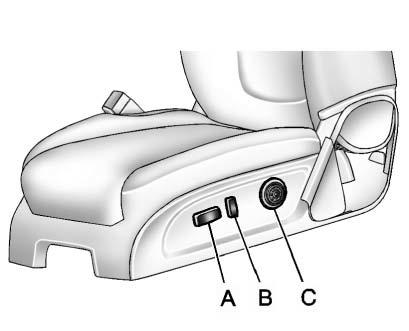
A. Seat Adjustment Control B. Reclining Seatback Control C. Lumbar Adjustment Control. Move the seat forward or rearward by sliding control (A) in the desired direction.
► Raise or lower the front or rear part of the seat cushion by moving the front
or rear of control (A) up or down.
► Raise or lower the entire seat by moving control (A) up or down.
See Power Seat Adjustment.
To raise or recline the seatback, tilt the top of control (B) forward or rearward. See Reclining Seatbacks.
Press the front or rear of control (C) to increase or decrease lumbar support. See Lumbar Adjustment.
Memory Features
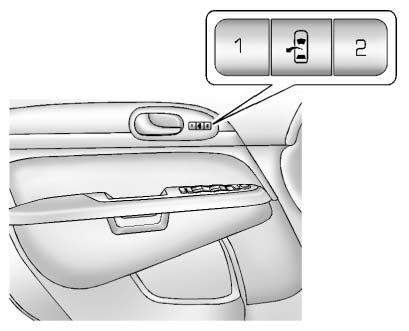
On vehicles equipped with memory features, the controls on the driver door are used to store and recall preferred positions for the driver seat, outside mirrors, and power steering column, if available. In the Buick Enclave, this allows different drivers to return the vehicle to their saved comfort settings quickly.
Storing Memory Positions
To save a position into memory:
1. Adjust the driver seat, seatback recliner, both outside mirrors, and the power steering column, if available.
See Power Mirrors and Steering Wheel Adjustment for more information.
Not all vehicles are equipped with the ability to save and recall mirror positions.
2. Press and hold “1” until two beeps sound.
3. Repeat the procedure for a second driver position using “2.” To recall a saved position, press and release "1"
or "2." The vehicle must be in P (Park).
► A single beep will sound. The seat and outside mirrors will move to the position previously stored for the identified driver.
See Memory Seats and Vehicle Personalization for more information.
Easy Exit Position
The easy exit feature can move the driver seat rearward and, if equipped, move the power steering column up and forward. This provides extra room when exiting the Buick Enclave.
► : Press to recall the easy exit positions. The vehicle must be in P (Park).
See Memory Seats and Vehicle Personalization for more information.
