
Buick Enclave: Steering Wheel Adjustment. Steering Wheel Controls. Windshield Wiper/Washer
Steering Wheel Adjustment
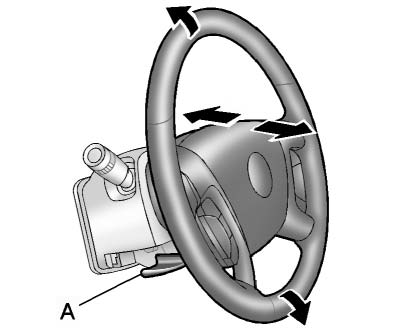
1. Pull the lever (A) down to release the steering column.
2. Move the steering wheel up or down until it is positioned comfortably.
3. Pull the steering wheel closer to you or push it farther away to adjust the reach.
4. Push the lever (A) up firmly to lock the steering wheel securely in place.
Before driving the Buick Enclave, make sure the steering wheel is locked and that the position allows a clear view of the instrument cluster and comfortable access to the pedals and controls.
Power Tilt Wheel
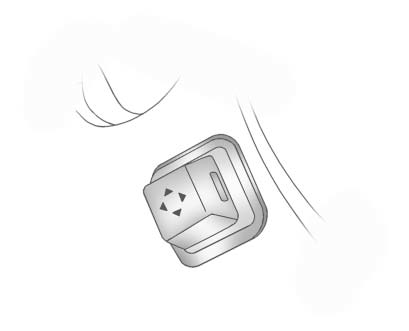
For vehicles equipped with the power tilt and telescoping steering wheel, the adjustment control is located on the outboard side of the steering column.
Push the control up or down to tilt the steering wheel upward or downward.
Push the control forward or rearward to move the steering wheel toward the front of the vehicle or closer to the driver. To save the preferred steering wheel position in memory, see Vehicle Personalization.
Do not adjust the steering wheel while driving. Set the wheel position only when the vehicle is stopped, so full attention can remain on the road.
Steering Wheel Controls
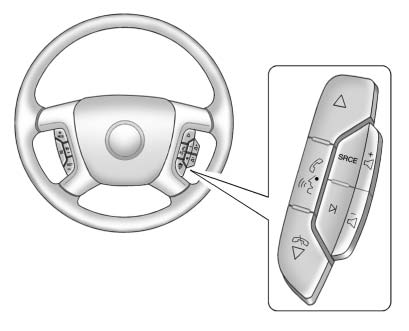
Vehicles with steering wheel audio controls may have different button layouts depending on equipment and options. Some audio, phone, media, and voice functions can be operated directly from the steering wheel, allowing the driver to keep both hands closer to the driving position.
In the Buick Enclave, these controls are intended to make common audio and communication functions easier to use without reaching for the center stack.
 (Next/Previous):
Press this control to select preset or favorite radio stations, choose tracks on a CD or DVD, or select tracks and move through folders on an iPod® or USB device.
To select preset or favorite radio stations:
► Press and release to move to the next or previous radio station stored as a preset or favorite.
To select tracks on a CD/DVD, if equipped:
Press and release to move to the next or previous track.
To select tracks on an iPod or USB device for vehicles without a navigation system:
1. Press and hold while listening to a song until the contents of the current folder appear on the radio display.
2. Press and release to scroll up or down through the list, then press and hold, or press, to play the highlighted track.
To select tracks on an iPod or USB device for vehicles with a navigation system:
1. Press and hold while listening to a song listed on the main audio page to move quickly forward or in reverse through the tracks. See the separate navigation manual for more information.
Track information is shown on the screen. Release
when the desired track is reached.
2. Press and release w and c/ x to begin playing the track shown in the display.
To navigate folders on an iPod or USB device for vehicles without a navigation system:
1. Press and hold while listening to a song until the contents of the current folder appear on the radio display.
2. Press and release to go back to the previous folder list.
3. Press and release to scroll up or down the list. To select a folder, press and hold
 , or press
 when the folder is highlighted.
► To go back farther in the folder list, press and hold
 .
.
To navigate folders on an iPod or USB device for vehicles with a navigation system:
1. Open Music Navigator by touching the folder button on the center touch screen from the main audio page.
2. While in Music Navigator, choose the folder, artist, genre, category, or other available music grouping using the touch screen.
3. Press and release  to scroll through the selected music list. Touch the track label on the screen to highlight it and begin playing the track from that list.
4. Press and hold  to scroll quickly through the selected music list.
 (Mute/Push to Talk): Press this button to silence the vehicle speakers only.
Press it again to turn the sound back on.
For vehicles equipped with Bluetooth or OnStar® systems, press and hold the button for longer than two seconds to interact with those systems.
See Bluetooth and OnStar Overview for more information.
(End): Press this button to reject an incoming call or end a current call.
SRCE (Source/Voice Recognition): Press this button to switch between available audio sources, including radio, CD, and, on equipped vehicles, DVD, front auxiliary, and rear auxiliary inputs.
For vehicles with the navigation system, press and hold this button for longer than one second to start voice recognition.
See “Voice Recognition” in the navigation manual for more information.
 (Seek): Press this button to go to the next radio station while listening to AM, FM, or XM™.
For vehicles with or without a navigation system:
Press  to move to the next track or chapter when the CD or DVD slot is the active source.
Press  to select a track or folder when navigating folders on an iPod or USB device.
For vehicles with a navigation system:
1. Press and hold  until a beep is heard to place the radio into SCAN mode. Each station plays for five seconds before the system moves to the next station.
2. To stop the SCAN function, press  again.
3. In CD/DVD, iPod, or AUX USB mode, press and hold the control to move quickly forward through the tracks.
Release the control to stop on the desired track.
 (Volume): Press this control to increase or decrease the volume.
These steering wheel controls help keep frequently used audio and communication functions close to the driver while operating the Buick Enclave.
Horn
Press  on the steering wheel pad to sound the horn.
The horn should be used when needed to alert other drivers, pedestrians, or road users. Always use it responsibly and only when the situation requires attention.
Windshield Wiper/Washer
The windshield wiper/washer lever is located on the left side of the steering column, where it can be reached without taking your hand far from the steering wheel.
Turn the band marked with the wiper symbol to select the desired windshield wiper setting for the current driving conditions.
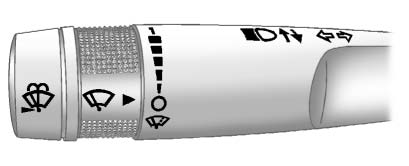
 (Mist): Use this setting for a single wiping cycle, such as when light moisture, road spray, or a small amount of mist appears on the windshield.
 (Off): Use this position to turn the windshield wipers off.
► (Adjustable Interval Wipes):
This setting delays the wiping cycle. Turn the band upward for more frequent wipes or downward for less frequent wipes, depending on the amount of rain, mist, or road spray on the windshield.
► Use the slow wipe setting for steady light rain or moderate moisture on the glass.
2: Use the fast wipe setting for heavier rain or conditions that require quicker clearing of the windshield.
Before using the wipers on the Buick Enclave, clear ice, packed snow, or heavy frost from the windshield and wiper blades. If the blades are frozen to the windshield, carefully loosen or thaw them before turning the wipers on. Damaged or worn wiper blades should be replaced. See Wiper Blade Replacement.
Heavy snow or ice can overload the wiper motor. If this happens, a circuit breaker stops wiper operation until the motor cools. Remove the buildup before attempting to use the wipers again.
Windshield Washer
(Washer Fluid): Press the button at the end of the turn signal/lane change lever to spray washer fluid onto the windshield.
The wipers will clear the windshield and then either stop or return to the previously selected wiper speed. The ignition key must be in ACC/ACCESSORY or ON/RUN for the washer system to operate. See Washer Fluid.
 WARNING
In freezing weather, do not use the washer until the windshield is warm. Otherwise, washer fluid can freeze on the glass and block your view of the road.
When the washer fluid level is low, the Driver Information Center (DIC) displays WASHER FLUID LOW ADD FLUID. Add the correct washer fluid as soon as possible. See Washer Fluid Messages.
