
Buick Enclave: Rear Window Wiper/Washer. Compass. Clock
Rear Window Wiper/Washer
The rear wiper and rear washer button is located on the instrument panel below the climate control system.
 (Rear Wiper): Press this button to turn the rear wiper on or off. The rear wiper speed is fixed and cannot be adjusted.
 (Wash): Press this button to spray washer fluid onto the rear window.
The rear window wiper will also operate when washer fluid is sprayed. Release the button when enough fluid has been applied to the glass. After the button is released, the rear wiper will continue for several additional cycles to help clear the window. If the rear wiper was already on before pressing the wash button, it will remain on until the rear wiper button is pressed again.
The rear window washer uses the same washer fluid reservoir as the windshield washer system. See Washer Fluid.
Compass
Your vehicle may have a compass displayed in the Driver Information Center (DIC). See Driver Information Center (DIC) for more information about using the display and vehicle information menus.
Compass Zone
The compass zone is set to zone eight when the vehicle leaves the factory. Your dealer will set the correct zone for your location when needed.
In some situations, such as a long-distance cross-country trip or a move to another state or province, the compass may need to be adjusted for local magnetic variance. If the zone is not set correctly, reset the compass zone through the DIC.
Compass variance is the difference between magnetic north and true geographic north. If the compass is not set to the zone where the Buick Enclave is being driven, the displayed direction may be inaccurate. The compass must be set to the correct variance zone for the area of travel.
To adjust for compass variance, use the following procedure:
Compass Variance (Zone) Procedure
1. Do not set the compass zone while the vehicle is moving.
Only set the compass zone when the vehicle is in P (Park).
Press the vehicle information button until PRESS V TO CHANGE COMPASS ZONE appears on the display.
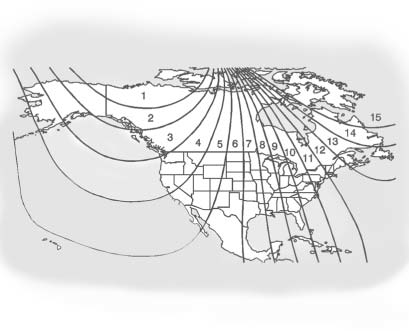
2. Find the vehicle’s current location and the corresponding variance zone number on the map.
Zones 1 through 15 are available.
3. Press the set/reset button to scroll through the available zones and select the correct variance zone.
4. Press the trip/fuel button until the vehicle heading, such as N for North, is displayed in the DIC.
5. If calibration is needed, calibrate the compass.
See “Compass Calibration Procedure” below.
Compass Calibration
The compass can be calibrated manually. Perform calibration only in a safe, open, magnetically clean area, such as an empty parking lot, where driving in circles will not create a hazard.
For best results, calibrate the compass away from tall buildings, utility wires, manhole covers, large metal structures, or industrial areas whenever possible.
If CAL appears in the DIC display, the compass should be calibrated.
If the DIC does not show a heading, such as N for North, or if the heading does not change after turns, a strong magnetic field may be interfering with compass operation. Possible sources include a magnetic CB antenna mount, a magnetic cell phone antenna mount, a magnetic emergency light, a magnetic note pad holder, or another magnetic object. Turn the vehicle off, move the magnetic item away, then turn the vehicle back on and calibrate the compass.
To calibrate the compass in the Buick Enclave, use the following procedure:
Compass Calibration Procedure
1. Before calibrating the compass, make sure the compass zone is set to the correct variance zone for the area where the vehicle is located.
See “Compass Variance (Zone) Procedure” earlier in this section.
Do not operate switches such as the windows, sunroof, climate controls, seats, or other electrical controls during the calibration procedure.
This helps prevent unnecessary interruption while the compass is learning the surrounding magnetic conditions.
2. Press the vehicle information button until PRESS V TO CALIBRATE COMPASS appears.
3. Press the set/reset button to begin compass calibration.
4. The DIC will display CALIBRATING: DRIVE IN CIRCLES. Drive the Buick Enclave in tight circles at less than 8 km/h (5 mph) until calibration is complete. When finished, the DIC will display CALIBRATION COMPLETE for a few seconds and then return to the previous menu.
Clock
To adjust the time and date, use the radio controls and the display prompts as described below:
1. Turn the ignition key to ACC/ACCESSORY or ON/RUN, then press
 to turn the radio on.
2. Press  to display HR, MIN, MM, DD,
YYYY, which represent hour, minute, month, day, and year.
to display HR, MIN, MM, DD,
YYYY, which represent hour, minute, month, day, and year.
3. Press the pushbutton located directly under the label you want to change.
4. To increase the selected time or date value, use one of the following methods:
► Press the pushbutton below the selected label.
► Press  SEEK.
SEEK.
► Press  FWD.
FWD.
► Turn  clockwise.
5. To decrease the selected time or date value, use one of the following methods:
► Press  SEEK.
SEEK.
► Press  REV.
REV.
► Turn  counterclockwise.
To change the default time format from 12-hour to 24-hour, or to change the default date format from month/day/year to day/month/year, use the following procedure:
1. Press  and then press the pushbutton
located under the forward arrow shown on the radio screen until the 12H and 24H time options, and the MM/DD and DD/MM date options, are displayed.
and then press the pushbutton
located under the forward arrow shown on the radio screen until the 12H and 24H time options, and the MM/DD and DD/MM date options, are displayed.
2. Press the pushbutton located under the desired option.
3. Press again to apply the selected
default setting, or allow the screen to time out.
