
Buick Enclave: Specifications, Diagnostic Information and Procedures
SPECIFICATIONS
FASTENER TIGHTENING SPECIFICATIONS
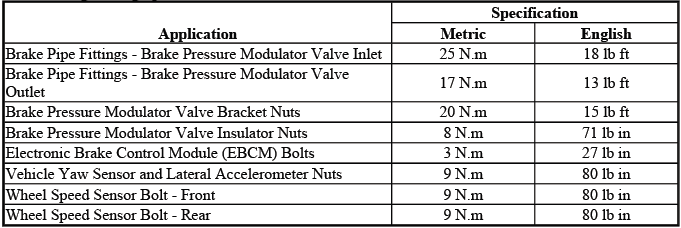
Fastener Tightening Specifications
The fastener tightening specifications are used when servicing ABS-related components, brackets, hydraulic parts, sensors, and supporting hardware. Correct torque is important because over-tightening can damage threads, distort brackets, or stress electronic components, while under-tightening may allow movement, noise, poor grounding, or inaccurate sensor readings. Always use a calibrated torque wrench and follow the exact service procedure for the component being installed.
SCHEMATIC WIRING DIAGRAMS
ANTI-LOCK BRAKE SYSTEM WIRING SCHEMATICS
Power, Ground, Serial Data and Traction Control
The ABS wiring schematics show the power supply, ground paths, serial data circuits, and traction control connections used by the electronic brake control module. These diagrams should be reviewed before circuit testing begins, because the ABS, traction control, stability control, and other vehicle systems may share communication lines and operating data. A poor ground, low ignition voltage, open circuit, or serial data fault can affect more than one warning lamp or system function.
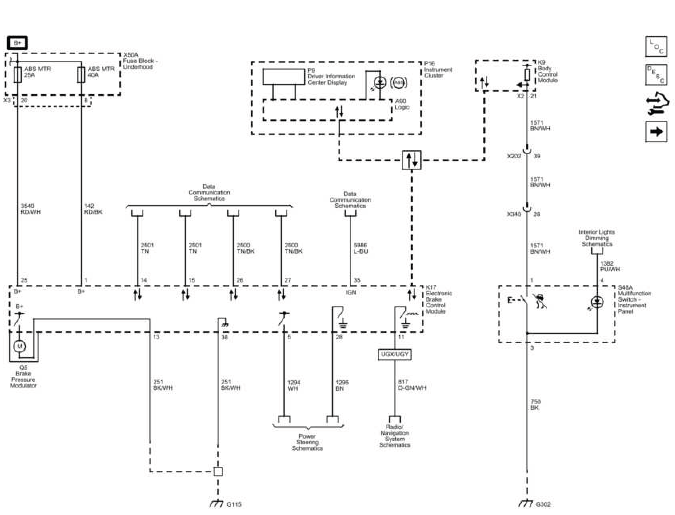
Fig. 1: Power, Ground, Serial Data and Traction Control Wiring Schematics
Wheel Speed Sensors
The wheel speed sensor schematic helps trace the sensor power, signal, and return paths between the sensors and the electronic brake control module. Wheel speed data is one of the most important inputs for anti-lock braking, traction control, and stability control operation. When diagnosing a Buick Enclave wheel speed concern, the wiring diagram should be used together with scan tool data, circuit tests, and a physical inspection of the sensor and harness.
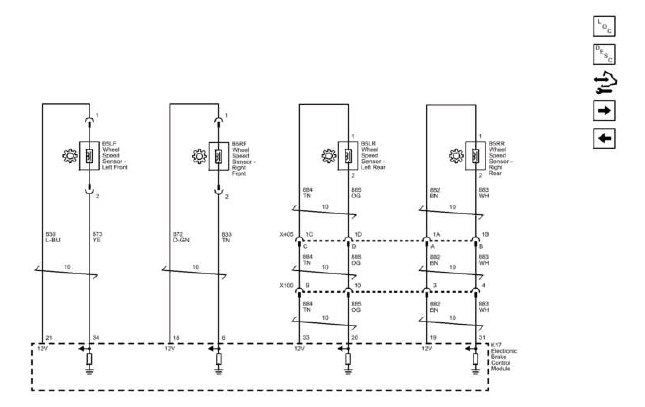
Fig. 2: Wheel Speed Sensors Wiring Schematics
Stability Control
The stability control schematic shows circuits used by the system to monitor vehicle movement and support brake intervention when needed. Stability control depends on accurate wheel speed, steering, yaw, lateral acceleration, brake, and module communication information. A wiring issue in this area can cause ABS, traction, or stability warnings even when the base hydraulic brakes still operate normally.
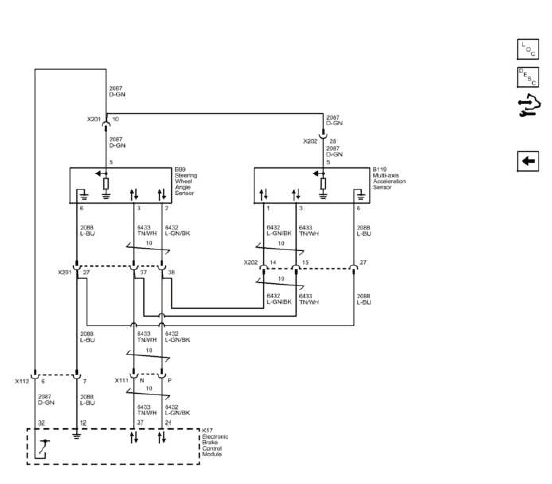
Fig. 3: Stability Control Wiring Schematics
DIAGNOSTIC INFORMATION AND PROCEDURES
DIAGNOSTIC CODE INDEX
The diagnostic code index provides a starting point for selecting the correct procedure after a DTC is retrieved from the electronic brake control module. Do not replace parts based only on the code title. A DTC identifies the circuit or condition that the module detected, but the actual cause may be a sensor, connector, wiring fault, low voltage, damaged tone ring, wheel bearing issue, or a mechanical condition that affects the signal.
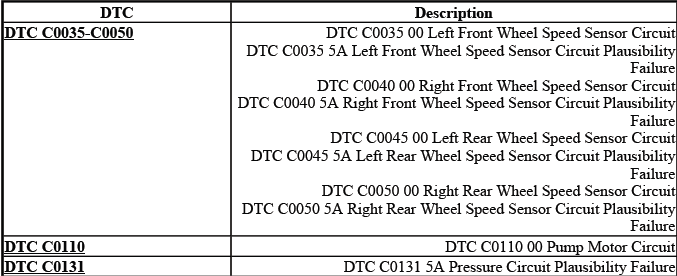
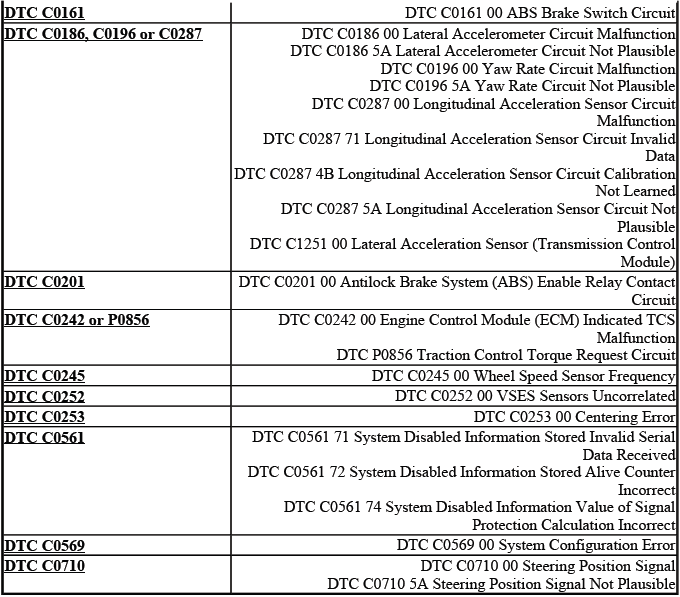
DTC C0035-C0050: WHEEL SPEED SENSOR
Diagnostic Instructions
- Perform the Diagnostic System Check - Vehicle prior to using this diagnostic procedure. This confirms module communication, checks for related system faults, and prevents focusing on one sensor before the full vehicle condition is understood.
- Review Strategy Based Diagnosis for an overview of the diagnostic approach. A structured diagnosis helps separate electrical faults from sensor signal concerns and mechanical wheel-end problems.
- Diagnostic Procedure Instructions provides an overview of each diagnostic category. Follow the procedure in order, especially when testing circuits that share voltage, ground, or module inputs.
DTC Descriptors
DTC C0035 00
- Left Front Wheel Speed Sensor Circuit
DTC C0035 5A
- Left Front Wheel Speed Sensor Circuit Plausibility Failure
DTC C0040 00
- Right Front Wheel Speed Sensor Circuit
DTC C0040 5A
- Right Front Wheel Speed Sensor Circuit Plausibility Failure
DTC C0045 00
- Left Rear Wheel Speed Sensor Circuit
DTC C0045 5A
- Left Rear Wheel Speed Sensor Circuit Plausibility Failure
DTC C0050 00
- Right Rear Wheel Speed Sensor Circuit
DTC C0050 5A
- Right Rear Wheel Speed Sensor Circuit Plausibility Failure
The “00” codes generally direct the diagnosis toward a circuit fault such as an open, short, high resistance, or missing signal. The “5A” codes point toward signal plausibility, meaning the electronic brake control module is seeing a wheel speed value that does not agree with expected vehicle behavior. On a Buick Enclave, plausibility concerns may come from a damaged sensor, wiring movement, wheel bearing play, tone ring damage, tire size mismatch, debris near the sensor, or an intermittent connection.
Diagnostic Fault Information
The diagnostic fault information tables should be used to identify the circuit or condition related to the DTC. Before disconnecting the module or replacing a sensor, inspect the harness routing near the wheel end, connector locks, terminal tension, corrosion, moisture intrusion, and any evidence of rubbing or impact damage. Wheel speed sensor circuits are exposed to road splash, heat, vibration, and suspension movement, so intermittent faults are common when wiring is strained or contaminated.
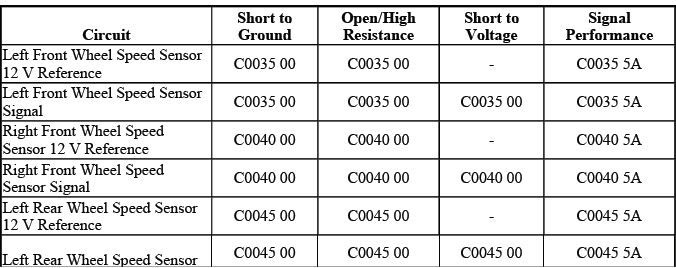

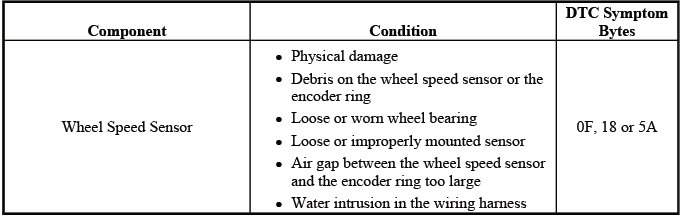
Mechanical Fault Table
The mechanical fault table is important because not every wheel speed sensor DTC is caused by an electrical failure. A loose wheel bearing, damaged encoder ring, excessive air gap, incorrect tire diameter, brake debris, or a sensor mounting issue can produce a signal that looks erratic or implausible to the control module. Always compare mechanical inspection results with scan tool wheel speed data before completing the repair.
Circuit/System Description
The wheel speed sensor receives ignition voltage from the electronic brake control module (EBCM) and provides a DC square wave signal back to the module. As the wheel rotates, the EBCM reads the frequency of that square wave signal and calculates wheel speed. The module then compares all four wheel speed signals to determine whether ABS, traction control, or stability control intervention is needed.
A clean and consistent wheel speed signal is critical. If the signal drops out, becomes erratic, reads differently from the other wheels, or loses its voltage supply, the EBCM may disable related functions to protect system operation. This is why diagnosis should include both electrical testing and a close inspection of the wheel-end mechanical parts.
Conditions for Running the DTC
C0035 00-C0050 00
- Ignition ON.
- Ignition voltage is greater than 9.5 V.
C0035 5A-C0050 5A
- Ignition ON.
- Ignition voltage is greater than 9.5 V.
- The brake pedal is not pressed.
- A DTC is not set for the other wheel speed sensor on the same axle.
The module needs stable ignition voltage before it can evaluate the wheel speed circuits correctly. Low system voltage, weak battery condition, poor charging performance, or voltage drop in the ignition feed can create misleading symptoms. For plausibility codes, the EBCM also considers brake pedal status and compares the suspect sensor against other wheel speed inputs.
Conditions for Setting the DTC
C0035 00-C0050 00
- A missing wheel speed sensor signal.
- Wheel speed sensor power supply is less than 7.6 V.
- A short to voltage, short to ground or an open/high resistance is detected on the signal circuit.
- A short to ground or an open/high resistance is detected on the wheel speed sensor 12 V reference circuit.
C0035 5A-C0050 5A
An erratic signal output of the wheel speed sensor is detected. This may happen if the signal changes suddenly, drops in and out, does not match the other wheels, or becomes unstable because of a wiring, sensor, bearing, encoder, or mounting concern.
Actions Taken when the DTC Sets
- The ABS indicator illuminates.
- The Stability indicator illuminates.
- The EBCM disables the voltage to the wheel speed sensor the fault is detected on.
- The EBCM disables the ABS, the traction control system and the vehicle stability enhancement system for the duration of the ignition cycle.
When one of these DTCs sets, base braking remains available, but the anti-lock, traction, and stability functions may be disabled for that ignition cycle. The driver may notice warning indicators and a change in brake assist behavior during low-traction events. The fault should be repaired before the vehicle is returned to normal use.
Conditions for Clearing the DTC
- The condition for the DTC is no longer present.
- The EBCM clears the history DTC when a current DTC is not detected in 40 consecutive drive cycles.
After the repair is completed, clear the codes with a scan tool and verify the repair under the same conditions that originally triggered the fault. Watch live wheel speed data during a slow road test and confirm that all four sensors increase smoothly and remain consistent with vehicle speed.
NOTE: During normal diagnostic and/or repair verification technicians may find that the ABS, Traction Control and/or Stability indicators may be ON with NO DTCs displayed by the EBCM. Do not replace the EBCM for this condition.
If the warning indicators are on but no EBCM DTCs are displayed, continue diagnosis instead of replacing the module. Check scan tool communication, ignition cycles, related modules, power and ground circuits, tire size consistency, and any recent repairs that may affect ABS or stability system data. A careful final verification is especially important on the Buick Enclave because wheel speed data may be shared by multiple safety and traction-related systems.
If the ABS, Traction Control and/or Stability indicators are ON with no DTCs set, do not replace the EBCM immediately. This condition may occur during normal diagnostic work or repair verification when the module has not completed its self-test or when the system status has not reset after an ignition cycle. Follow the steps below to allow the system to recheck itself before continuing with component diagnosis.
1. Remove the key from the ignition, open and close the driver's door to turn off retained accessory power (RAP) and wait 60 seconds. This gives the vehicle modules time to power down fully and can clear a temporary indicator state that remains after testing or service.
2. Ignition ON, if the ABS, Traction Control and/or Stability indicators are still illuminated, operate the vehicle at speeds greater than 16 km/h (10 MPH) to complete the self test. The EBCM should request all indicators to turn OFF. Drive in a safe area and maintain steady operation long enough for the module to evaluate wheel speed inputs.
3. If the indicators remain ON with no DTCs set after the drive cycle, disconnect the battery for at least 60 seconds then reconnect the battery. This resets module power and may clear a retained status that is not tied to an active diagnostic trouble code.
4. Operate the vehicle at speeds greater than 40 km/h (25 MPH), the EBCM should request all indicators to turn OFF. If the indicators stay illuminated after this drive cycle, continue with normal electrical, communication, and sensor diagnosis instead of assuming the control module has failed.
Diagnostic Aids
- Do not use a magnet to clean the encoder ring. Magnetic tools can leave debris or affect the signal area, creating inaccurate wheel speed readings.
- Inspect the wheel hub bearing encoder ring for rust or corrosion. Contamination, missing encoder material, or physical damage can create an erratic signal that may look like a sensor fault.
- If two or more wheel speed sensors are inoperative, diagnose each wheel speed sensor individually. Multiple faults can share a cause, but each circuit and sensor should still be verified on its own.
- If any of the symptom codes 0F, 18 or 5A are set, refer to the Diagnostic Fault Information table for possible mechanical faults or conditions. These codes may point to bearing, encoder, air gap, tire, or wheel-end issues rather than a simple open circuit.
- If the customer comments that the ABS indicator is ON only during moist environmental conditions such as rain, snow, or vehicle washing, inspect the wheel speed sensor wiring for signs of water intrusion. Pay close attention to connector seals, harness routing, rubbed insulation, corrosion, and areas where splash water can collect.
On a Buick Enclave, wheel speed sensor faults can be caused by electrical problems, but they can also be caused by mechanical wheel-end conditions. A clean connector, proper terminal tension, a stable sensor signal, and a healthy hub encoder are all required for reliable ABS, traction control, and stability system operation.
Reference Information
Schematic Reference
Anti-lock Brake System Schematics
Connector End View Reference
COMPONENT CONNECTOR END VIEWS - INDEX
Description and Operation
ABS Description and Operation
Electrical Information Reference
- Circuit Testing
- Connector Repairs
- Testing for Intermittent Conditions and Poor Connections
- Wiring Repairs
Scan Tool Reference
Control Module References for scan tool information
The reference information should be used together rather than separately. Wiring diagrams show the circuit path, connector views identify the terminals, description and operation explains how the system should behave, and scan tool data confirms what the EBCM is actually seeing while the vehicle is moving.
Circuit/System Verification
Observe the scan tool Wheel Speed Sensor parameter. The reading should be the same speed on all sensors when driving in a straight line at a speed greater than 20 km/h (13 MPH). A small momentary variation can occur during turns or wheel slip, but during straight, steady driving all four wheel speeds should remain consistent.
If one wheel speed signal drops out, reads zero, spikes, or differs from the other wheels, focus on that sensor circuit and the related wheel-end components. For the Buick Enclave, this comparison is one of the fastest ways to separate a single sensor issue from a broader power, ground, or module communication concern.
Circuit/System Testing
NOTE: If any of the symptom codes 0F, 18 or 5A are set, refer to the Diagnostic Fault Information table for possible mechanical faults or conditions.
1. Ignition OFF, disconnect the harness connector at the EBCM. Inspect the connector body, terminals, seals, and locking mechanism before testing. Moisture, corrosion, backed-out terminals, or poor terminal tension can cause intermittent wheel speed sensor faults.
2. Ignition ON, test for less than 1 V between the 12 V reference circuit terminal of the appropriate sensor listed below and ground. This checks whether unwanted voltage is present on the reference circuit while the EBCM connector is disconnected.
- Left front sensor circuit terminal 21
- Right front sensor circuit terminal 18
- Left rear sensor circuit terminal 33
- Right rear sensor circuit terminal 19
- If greater than the specified range, test the 12 V reference circuit for a short to voltage.
3. Test for less than 1 V between the signal circuit terminal of the appropriate sensor listed below and ground. An unexpected voltage reading can indicate a short to voltage, circuit contact with another wire, or an incorrect connection in the harness.
- Left front sensor circuit terminal 34
- Right front sensor circuit terminal 6
- Left rear sensor circuit terminal 20
- Right rear sensor circuit terminal 31
- If greater than the specified range, test the signal circuit for a short to voltage.
4. Ignition OFF, test for infinite resistance between the 12 V reference terminal of the appropriate sensor circuit listed below and ground. This test checks for a short to ground in the reference circuit. Make sure the circuit is not loaded by a connected component while performing the resistance check.
- Left front sensor circuit terminal 21
- Right front sensor circuit terminal 18
- Left rear sensor circuit terminal 33
- Right rear sensor circuit terminal 19
- If less than the specified value, test the 12 V reference circuit for a short to ground.
5. Test for infinite resistance between the following signal circuit terminal of the appropriate sensor circuit listed below and ground. A lower-than-expected resistance reading means the signal circuit may be shorted to ground, pinched, rubbed through, contaminated, or connected through corrosion.
- Left front sensor circuit terminal 34
- Right front sensor circuit terminal 6
- Left rear sensor circuit terminal 20
- Right rear sensor circuit terminal 31
- If less than the specified value, test the signal circuit for a short to ground.
6. Ignition OFF, disconnect the harness connector at the appropriate wheel speed sensor. Inspect the wheel speed sensor connector and the harness near the suspension and wheel well. These areas move, flex, and are exposed to road splash, so damaged insulation or moisture intrusion can create faults that only appear while driving.
7. Test for less than 2 ohms between the appropriate 12 V reference circuit terminals listed below. This verifies circuit continuity from the EBCM connector to the wheel speed sensor connector.
- Left front sensor circuit terminal 21 at the EBCM harness connector and terminal 1 at the wheel speed sensor harness connector
- Right front sensor circuit terminal 18 at the EBCM harness connector and terminal 1 at the wheel speed sensor harness connector
- Left rear sensor circuit terminal 33 at the EBCM harness connector and terminal 1 at the wheel speed sensor harness connector
- Right rear sensor circuit terminal 19 at the EBCM harness connector and terminal 1 at the wheel speed sensor harness connector
- If greater than the specified range, test the 12 V reference circuit for an open or high resistance.
8. Test for less than 2 ohms between the appropriate signal circuit terminals listed below. A high resistance reading can be caused by broken wire strands, loose terminals, corrosion inside a connector, poor previous wiring repairs, or harness damage near the wheel end.
- Left front sensor circuit terminal 34 at the EBCM harness connector and terminal 2 at the wheel speed sensor harness connector
- Right front sensor circuit terminal 6 at the EBCM harness connector and terminal 2 at the wheel speed sensor harness connector
- Left rear sensor circuit terminal 20 at the EBCM harness connector and terminal 2 at the wheel speed sensor harness connector
- Right rear sensor circuit terminal 31 at the EBCM harness connector and terminal 2 at the wheel speed sensor harness connector
- If greater than the specified range, test the signal circuit for an open or high resistance.
After circuit testing is complete, reconnect all connectors securely, clear any stored DTCs, and verify the repair with scan tool wheel speed data during a straight-line road test. The final check should confirm that all four wheel speed sensors report smoothly and evenly, with no warning indicators returning during the test drive.
9. If all circuits test normal, replace the appropriate wheel speed sensor. If the DTC resets after the sensor replacement and all related wiring, terminals, and connector conditions have been verified again, replace the EBCM. Do not move to module replacement until the sensor circuit has been fully confirmed, because poor terminal tension, intermittent harness movement, or corrosion at the wheel-end connector can return the same fault.
Repair Instructions
Perform the Diagnostic Repair Verification after completing the repair. Clear the DTCs, operate the vehicle under the conditions required by the diagnostic procedure, and confirm that the ABS, traction control, and stability indicators do not return. A short road test with scan tool wheel speed data is recommended after wheel speed sensor or EBCM service.
- Front Wheel Speed Sensor Replacement
- Rear Wheel Speed Sensor Replacement
- Control Module References for EBCM replacement, programming and setup
DTC C0110: PUMP MOTOR CIRCUIT
Diagnostic Instructions
- Perform the Diagnostic System Check - Vehicle prior to using this diagnostic procedure. This confirms module communication, battery voltage condition, related DTCs, and whether the complaint is isolated to the pump motor circuit.
- Review Strategy Based Diagnosis for an overview of the diagnostic approach. The pump motor circuit should be tested in a logical order because power, ground, internal modulator faults, and EBCM control faults can produce similar symptoms.
- Diagnostic Procedure Instructions provides an overview of each diagnostic category. Follow the category steps carefully, especially when checking high-current circuits that operate the pump motor.
DTC Descriptor
DTC C0110 00
- Pump Motor Circuit
Diagnostic Fault Information
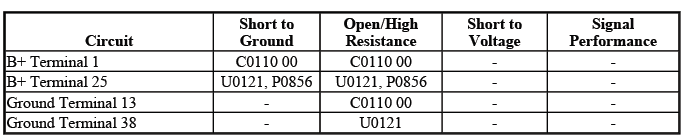
Circuit/System Description
The pump motor is an integral part of the brake pressure modulator valve, while the pump motor relay is built into the electronic brake control module (EBCM). During normal braking, the pump motor relay is not engaged. When ABS, traction control, or stability control operation is required, the EBCM activates the pump motor relay and turns the pump motor ON to help manage hydraulic pressure inside the modulator.
On a Buick Enclave, the pump motor circuit is important because it supports anti-lock braking and stability-related brake pressure control during low-traction or corrective braking events. A fault in this circuit can disable several safety-related functions at the same time, even though the base hydraulic brake system may still operate.
Conditions for Running the DTC
- Ignition is ON.
- Initialization is complete.
The EBCM must complete its startup checks before it can evaluate the pump motor circuit correctly. Low battery voltage, poor grounds, or incomplete module initialization can interfere with reliable testing, so the electrical supply condition should be confirmed before deeper diagnosis.
Conditions for Setting the DTC
- The EBCM detects the pump motor runs continuously.
- The EBCM detects the pump motor is binding or stalled.
- The EBCM detects an open/high resistance on the ground circuit.
- The EBCM detects a short to ground or an open/high resistance on the B+ circuit.
This DTC may set because the pump motor is mechanically restricted, electrically open, poorly grounded, shorted, or supplied by a weak B+ circuit. A continuously running motor may indicate a control or relay-related problem, while a stalled or binding motor may point toward an internal brake pressure modulator valve concern.
Action Taken When the DTC Sets
- The ABS indicator illuminates.
- The red brake indicator illuminates.
- The stability control indicator illuminates.
- The driver information center displays All Wheel Drive OFF, Service StabiliTrak and Service Traction Control messages.
- The EBCM disables the ABS, the traction control system and the vehicle stability enhancement system for the duration of the ignition cycle.
When C0110 sets, the vehicle may display several warnings because the pump motor supports more than one brake-control function. The driver may still have base braking, but ABS, traction control, stability enhancement, and related AWD messaging can be affected until the fault is corrected and the system passes its checks.
Conditions for Clearing the DTC
- The condition for the DTC is no longer present.
- The EBCM clears the history DTC when a current DTC is not detected in 40 consecutive drive cycles.
After repairs are made, the DTC should be cleared with a scan tool and the pump motor operation should be verified. If the condition does not return during the commanded pump motor test and the warning indicators remain off after the required drive cycle, the repair can be considered verified.
NOTE: During normal diagnostic and/or repair verification technicians may find that the ABS, Traction Control and/or Stability indicators may be ON with NO DTCs displayed by the EBCM. Do not replace the EBCM for this condition.
If the ABS, Traction Control and/or Stability indicators are ON with no DTCs set, perform the following steps before replacing parts. This condition can occur when the system has not completed its self-test or when module status has not reset after service work.
1. Remove the key from the ignition, open and close the driver's door to turn off retained accessory power (RAP) and wait 60 seconds. This allows the modules to power down and exit a retained state.
2. Ignition ON, if the ABS, Traction Control and/or Stability indicators are still illuminated, operate the vehicle at speeds greater than 16 km/h (10 MPH) to complete the self test. The EBCM should request all indicators to turn OFF after it confirms normal system status.
3. If the indicators remain ON with no DTCs set after the drive cycle, disconnect the battery for at least 60 seconds then reconnect the battery. This resets module power and may clear a warning state that is not linked to an active fault.
4. Operate the vehicle at speeds greater than 40 km/h (25 MPH), the EBCM should request all indicators to turn OFF. If the indicators remain on after this step, continue diagnosis of power, ground, module communication, and system status rather than assuming the EBCM has failed.
Reference Information
Schematic Reference
Anti-lock Brake System Schematics
Connector End View Reference
COMPONENT CONNECTOR END VIEWS - INDEX
Description and Operation
ABS Description and Operation
Electrical Information Reference
- Circuit Testing
- Connector Repairs
- Testing for Intermittent Conditions and Poor Connections
- Wiring Repairs
Scan Tool Reference
Control Module References for scan tool information
Use the schematic, connector views, circuit testing procedures, and scan tool information together. The schematic shows the circuit path, connector views confirm terminal locations, and the scan tool verifies whether the EBCM can command the pump motor and recognize the system response.
Circuit Verification
Ignition ON, perform the Pump Motor Test with a scan tool and listen/feel the Pump Motor turn ON and OFF. A normal test should produce a clear pump motor response when commanded ON and no continued operation when commanded OFF.
If the pump motor does not run, runs weakly, remains on, or produces an abnormal sound, continue with circuit testing before replacing the modulator or control module. For the Buick Enclave, pump motor operation should be evaluated together with B+ feed quality, ground integrity, connector condition, and the brake pressure modulator valve assembly.
Circuit/System Testing
1. Ignition OFF, disconnect the harness connector at the EBCM. Before using a meter, inspect the connector for water intrusion, corrosion, overheated terminals, backed-out pins, spread terminals, damaged locks, or evidence of previous repairs.
2. Ignition OFF and all vehicle systems OFF. It may take up to 2 minutes for all vehicle systems to power down. Test for less than 10 ohms between the ground circuits listed below and ground:
- Terminal 13
- Terminal 38
- If greater than the specified range, test the ground circuit for an open/high resistance.
A high-resistance ground can prevent the pump motor from operating correctly or may cause the EBCM to detect a pump motor circuit fault. Check ground fasteners, splice points, corrosion, loose connections, and damaged wiring before replacing major components.
3. Ignition ON, verify that a test lamp illuminates between the B+ circuits listed below and ground.
- Terminal 1
- Terminal 25
- If the test lamp does not illuminate, test the B+ circuit for a short to ground or an open/high resistance. If the circuit tests normal and the B+ circuit fuse is open, replace the brake pressure modulator valve.
The test lamp confirms the circuit can carry current, not just show voltage on a digital meter. A circuit with corrosion or partially broken strands may show voltage but fail when loaded.
4. If all circuits test normal, replace the brake pressure modulator valve. The pump motor is part of the modulator valve assembly, so a verified internal pump motor fault is serviced by replacing the modulator valve rather than the motor separately.
Repair Instructions
Perform the Diagnostic Repair Verification after completing the repair. Confirm that the pump motor test completes normally, warning indicators remain off, and no ABS, traction control, stability, or brake-related DTCs return during the verification drive.
- Brake Pressure Modulator Valve Replacement
- Control Module References for EBCM replacement, programming and setup
DTC C0131: PRESSURE CIRCUIT PLAUSIBILITY FAILURE
Diagnostic Instructions
- Perform the Diagnostic System Check - Vehicle prior to using this diagnostic procedure. This confirms that module communication, voltage supply, stored DTCs, and related brake system conditions have been reviewed before focusing on one fault.
- Review Strategy Based Diagnosis for an overview of the diagnostic approach. A pressure plausibility concern should be diagnosed by comparing brake pedal input, pressure sensor data, brake lamp operation, and EBCM response instead of replacing parts by assumption.
- Diagnostic Procedure Instructions provides an overview of each diagnostic category. Follow the test sequence carefully because pressure sensor faults, brake switch data faults, loose module attachment, and hydraulic modulator concerns can create similar warning behavior.
DTC Descriptors
DTC C0131 5A
- Pressure Circuit Plausibility Failure
Circuit/System Description
The electronic brake control module uses input from the brake pressure sensor to support vehicle stability enhancement system functions. The brake pressure sensor is built into the brake pressure modulator valve, so it is not serviced as a separate external sensor. The EBCM compares pressure sensor information with brake pedal status, vehicle speed, and system operating conditions to decide whether the pressure reading is believable.
On the Buick Enclave, this pressure information helps the ABS, traction control, and stability systems understand when the driver is applying the brakes and how much hydraulic pressure is being developed. If the module sees pressure rising when the brake pedal is reported as released, or if the brake pedal is reported as applied but pressure does not rise as expected, the EBCM can set a plausibility fault.
Conditions for Running the DTC
- Ignition ON.
- Ignition voltage is greater than 10 V.
The module needs stable ignition voltage before it can evaluate brake pressure sensor information correctly. Low voltage, poor grounds, weak battery condition, or module power interruptions can interfere with accurate pressure comparison and should be considered if the fault is intermittent.
Conditions for Setting the DTC
- Internal pressure sensor fault.
- The electronic brake control module detects the brake pressure is increasing when braking and did not receive a message that the brake pedal is applied.
- The electronic brake control module detects the brake pressure does not increase when braking, when it received a message that the brake pedal is applied.
These conditions mean the EBCM is seeing a mismatch between hydraulic pressure and the expected brake pedal state. The cause may be an internal modulator pressure sensor concern, brake pedal status data that does not match actual brake use, calibration that must be performed, or a mounting issue between the EBCM and hydraulic unit.
Action Taken When the DTC Sets
- A driver information system message and/or a warning indicator may be displayed.
- The electronic brake control module disables the ABS, the traction control system and the vehicle stability enhancement system for the duration of the ignition cycle.
When this DTC is active, base braking may still be available, but the systems that rely on accurate brake pressure data can be disabled. The driver may see ABS, traction control, stability, or service messages until the fault is corrected and the system passes verification.
Conditions for Clearing the DTC
- The condition for the DTC is no longer present.
- The EBCM clears the history DTC when a current DTC is not detected in 40 consecutive drive cycles.
After repairs or calibration are completed, clear the DTC with a scan tool and verify that the fault does not reset during normal brake application and release. Brake pressure data should respond smoothly and agree with the brake pedal status seen by the module.
NOTE: During normal diagnostic and/or repair verification technicians may find that the ABS, Traction Control and/or Stability indicators may be ON with NO DTCs displayed by the EBCM. Do not replace the EBCM for this condition.
If the ABS, Traction Control and/or Stability indicators are ON with no DTCs set, perform the following steps before replacing parts. The indicators may remain on temporarily if the module has not completed its self-test or if retained module status has not reset after diagnostic work.
1. Remove the key from the ignition, open and close the driver's door to turn off retained accessory power (RAP) and wait 60 seconds. This allows the modules to power down fully and exit a retained accessory state.
2. Ignition ON, if the ABS, Traction Control and/or Stability indicators are still illuminated, operate the vehicle at speeds greater than 16 km/h (10 MPH) to complete the self test. The EBCM should request all indicators to turn OFF after it confirms normal system operation.
3. If the indicators remain ON with no DTCs set after the drive cycle, disconnect the battery for at least 60 seconds then reconnect the battery. This resets module power and may clear a status condition that is not tied to an active DTC.
4. Operate the vehicle at speeds greater than 40 km/h (25 MPH), the EBCM should request all indicators to turn OFF. If the indicators remain illuminated after this step, continue diagnosis of power, ground, communication, brake pedal data, and module status instead of assuming the EBCM has failed.
Diagnostic Aids
DTC C0131 can set if the electronic brake control module is loosely attached to the hydraulic unit. The mountings should be checked for the proper torque. A loose or unevenly seated EBCM can affect internal pressure sensor interpretation or create an inconsistent connection between the control module and brake pressure modulator valve.
Before replacing the brake pressure modulator valve, inspect the related module attachment points, connector condition, brake lamp operation, and scan tool brake pressure data. On a Buick Enclave, pressure plausibility diagnosis should include both electronic and mechanical checks because the EBCM depends on correct hydraulic pressure information and accurate brake pedal status at the same time.
Reference Information
Schematic Reference
Anti-lock Brake System Schematics
Connector End View Reference
COMPONENT CONNECTOR END VIEWS - INDEX
Description and Operation
ABS Description and Operation
Electrical Information Reference
- Circuit Testing
- Connector Repairs
- Testing for Intermittent Conditions and Poor Connections
- Wiring Repairs
Scan Tool Reference
Control Module References for scan tool information
Use the schematic, connector views, ABS description, electrical testing procedures, and scan tool information together. The scan tool can show whether the EBCM sees brake pedal application and pressure sensor change at the same time, while connector and circuit information helps verify whether the related inputs are reaching the module correctly.
Circuit/System Testing
1. Apply and release brake pedal. Verify brake lamps operate properly. The brake lamps are an important clue because brake pedal status is part of the comparison used by the EBCM. If the brake lamps do not match actual pedal movement, the pressure reading may appear implausible to the control module.
- If brake lamps do not operate properly, refer to Symptoms - Lighting.
2. Perform the scan tool electronic brake control module Brake Pressure Sensor Calibration. Refer to Brake Pressure Modulator Valve Pressure Sensor Calibration. Calibration teaches the module the correct pressure sensor baseline and should be completed before condemning the modulator valve for a plausibility issue.
3. Replace the brake pressure modulator valve. Replace the valve only after brake lamp operation, calibration, module attachment, connector condition, and related diagnostic checks have been completed. Since the brake pressure sensor is internal to the modulator valve, a confirmed internal pressure sensor fault requires modulator valve replacement.
Repair Instructions
Perform the Diagnostic Repair Verification after completing the repair. Clear the DTC, verify brake lamp operation, review scan tool brake pressure data, and confirm that ABS, traction control, and stability indicators do not return during the required drive cycle.
- Brake Pressure Modulator Valve Replacement
- Control Module References for Electronic Brake Control Module replacement, programming and setup
DTC C0161: ABS BRAKE SWITCH CIRCUIT
Diagnostic Instructions
- Perform the Diagnostic System Check - Vehicle prior to using this diagnostic procedure. This establishes whether the brake switch concern is isolated or part of a larger communication, voltage, or module input issue.
- Review Strategy Based Diagnosis for an overview of the diagnostic approach. The brake switch circuit should be diagnosed by comparing brake pedal status, brake lamp operation, pressure sensor response, and vehicle speed data.
- Diagnostic Procedure Instructions provides an overview of each diagnostic category. Follow the correct category for circuit, data, module, or mechanical input concerns.
DTC Descriptor
DTC C0161 00
- ABS Brake Switch Circuit
Circuit/System Description
The electronic brake control module (EBCM) monitors the brake pressure sensor voltage, vehicle speed, and a serial data message from the body control module (BCM) that indicates whether the brake pedal is Applied or Released. The EBCM uses this information to decide whether the hydraulic pressure reading matches what the driver is doing with the brake pedal.
When the vehicle is stopping, the EBCM expects brake pressure sensor voltage to increase and to correlate with a BCM serial data message showing that the brake pedal is applied. When the vehicle is accelerating or the brake pedal is released, the EBCM expects the pressure sensor voltage to return toward 0 volts and match the released brake pedal message.
For the Buick Enclave, this relationship is important because ABS, traction control, stability control, brake lamp information, and driver input data can interact through module communication. A mismatch between brake pedal status and brake pressure can cause warning indicators even when the physical brake pedal seems to work normally.
Conditions for Running the DTC
- The ignition is ON.
- The vehicle speed is greater than 11 km/h (7 MPH).
The vehicle must be moving above the specified speed so the EBCM can compare brake pedal status, pressure sensor behavior, and vehicle deceleration under realistic operating conditions.
Conditions for Setting the DTC
- The EBCM detects the vehicle speed decreases, the brake pedal is released and the brake pressure sensor detects an increase in pressure.
- The EBCM detects the vehicle speed is greater than 11 km/h (7 MPH), the brake pedal is applied for one minute and the brake pressure detects pressure less than the set value.
This DTC sets when the module sees brake switch information that does not agree with pressure or vehicle behavior. Possible causes may include a brake switch signal concern, BCM message issue, pressure sensor problem, wiring or connector fault, calibration issue, or a hydraulic condition that prevents pressure from rising as expected.
Action Taken When the DTC Sets
- A driver information center message and/or a warning indicator may be displayed. The exact message may depend on which related brake, traction, or stability function has been disabled by the electronic brake control module.
- The EBCM disables the ABS, the traction control and the vehicle stability enhancement system for the duration of the ignition cycle. Base braking may still be available, but the driver should not expect normal anti-lock braking, traction intervention, or stability correction while the fault is active.
Conditions for Clearing the DTC
- The condition for the DTC is no longer present. The EBCM must see brake switch, brake pressure, and vehicle behavior return to a believable operating pattern before the fault can be considered corrected.
- The EBCM clears the history DTC when a current DTC is not detected in 40 consecutive drive cycles. A history code should still be reviewed, especially if the customer complaint is intermittent or related to a specific driving habit.
NOTE: During normal diagnostic and/or repair verification technicians may find that the ABS, Traction Control and/or Stability indicators may be ON with NO DTCs displayed by the EBCM. Do not replace the EBCM for this condition.
If the ABS, Traction Control and/or Stability indicators are ON with no DTCs set, perform the following steps before replacing any control module. This condition may occur when the system has not completed a self-test or when retained module status has not fully reset after service.
1. Remove the key from the ignition, open and close the driver's door to turn off retained accessory power (RAP) and wait 60 seconds. This allows the involved modules to power down instead of staying awake in a retained accessory state.
2. Ignition ON, if the ABS, Traction Control and/or Stability indicators are still illuminated, operate the vehicle at speeds greater than 16 km/h (10 MPH) to complete the self test. The EBCM should request all indicators to turn OFF after the self-test confirms normal communication and expected sensor behavior.
3. If the indicators remain ON with no DTCs set after the drive cycle, disconnect the battery for at least 60 seconds then reconnect the battery. This resets module power and may clear a warning state that is not connected to a current diagnostic trouble code.
4. Operate the vehicle at speeds greater than 40 km/h (25 MPH), the EBCM should request all indicators to turn OFF. If the indicators remain illuminated after this step, continue diagnosis of module power, grounds, communication, brake switch input, and system status rather than assuming the EBCM is defective.
Diagnostic Aids
- DTC C0161 can set if the brake is applied while accelerating. This may happen during unusual pedal use, diagnostic driving, or a driving style where the brake and accelerator are used at the same time.
- DTC C0161 will be set if the brake is applied for 60 seconds while at speeds greater than 10 km/h (6 MPH), such as two-footed driving. If this pattern matches the customer’s driving behavior, explain the condition clearly before replacing parts.
On a Buick Enclave, C0161 should be evaluated by comparing brake pedal status, brake lamp operation, brake pressure sensor response, and vehicle speed. A code set by two-footed driving is different from a code caused by a failed switch, poor circuit connection, or incorrect pressure data.
Reference Information
Schematic Reference
- Anti-Lock Brake System Schematics
- Exterior Lights Schematics
Connector End View Reference
COMPONENT CONNECTOR END VIEWS - INDEX
Description and Operation
ABS Description and Operation
Electrical Information Reference
- Circuit Testing
- Connector Repairs
- Testing for Intermittent Conditions and Poor Connections
- Wiring Repairs
Scan Tool Reference
Control Module References for scan tool information
Use these references together during diagnosis. The ABS schematics show how the EBCM receives and processes brake-related inputs, the exterior lights schematic helps verify stop lamp operation, connector views confirm terminal locations, and scan tool data shows whether the modules agree about brake pedal position.
Circuit/System Verification
NOTE: If the ABS, and/or Traction Control indicators are ON with DTC C0161 set in history, perform the conditions for clearing the DTC and inform the customer that two footed driving set this DTC.
1. Ignition ON. Confirm that the instrument cluster and scan tool communication are operating normally before evaluating the brake switch status.
2. Verify the stop lamps turn ON and OFF while pressing and releasing the brake pedal. The stop lamps should respond cleanly with pedal movement, without delay, flicker, or staying on after the pedal is released.
If the stop lamps do not turn ON and OFF
Refer to Symptoms - Lighting. A stop lamp concern must be corrected before the ABS brake switch diagnosis can be considered complete, because the EBCM relies on brake pedal status information that may be related to the lighting system input.
If the stop lamps turn ON and OFF
3. Refer to Diagnostic Aids. If stop lamp operation is normal, review the customer’s driving conditions and scan tool brake switch data. Two-footed driving, extended brake application while moving, or a mismatch between pressure and switch status can explain why the code was stored.
DTC C0186, C0196 OR C0287: LATERAL ACCELEROMETER/YAW RATE CIRCUIT/LONGITUDINAL ACCELERATION SENSOR/LATERAL ACCELERATION SENSOR
Diagnostic Instructions
- Perform the Diagnostic System Check - Vehicle prior to using this diagnostic procedure. This confirms whether the concern is isolated to the accelerometer/yaw sensor system or related to communication, power, ground, calibration, or other stability control faults.
- Review Strategy Based Diagnosis for an overview of the diagnostic approach. Stability sensor faults should be diagnosed by comparing sensor data, vehicle speed, road conditions, calibration state, and module communication before replacing parts.
- Diagnostic Procedure Instructions provides an overview of each diagnostic category. Follow the procedure in order because circuit faults, internal sensor faults, invalid data, and calibration-not-learned conditions require different repair paths.
DTC Descriptors
DTC C0186 00
- Lateral Accelerometer Circuit Malfunction
DTC C0186 5A
- Lateral Accelerometer Circuit Not Plausible
DTC C0196 00
- Yaw Rate Circuit Malfunction
DTC C0196 5A
- Yaw Rate Circuit Not Plausible
DTC C0287 00
- Longitudinal Acceleration Sensor Circuit Malfunction
DTC C0287 71
- Longitudinal Acceleration Sensor Circuit Invalid Data
DTC C0287 4B
- Longitudinal Acceleration Sensor Circuit Calibration Not Learned
DTC C0287 5A
- Longitudinal Acceleration Sensor Circuit Not Plausible
DTC C1251 00
- Lateral Acceleration Sensor (Transmission Control Module)
These DTCs relate to the sensor inputs used to determine vehicle motion. Lateral acceleration describes side-to-side force, yaw rate describes vehicle rotation around its vertical axis, and longitudinal acceleration describes forward or rearward acceleration. The EBCM uses this information to decide whether the vehicle is following the driver’s intended path.
Diagnostic Fault Information
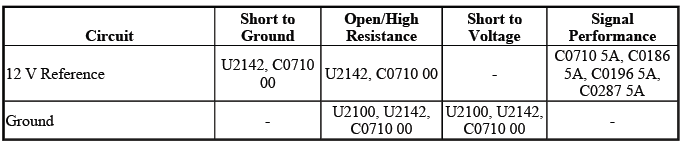
Circuit/System Description
The yaw rate, lateral acceleration and longitudinal acceleration sensors are combined into one yaw/lateral/longitudinal accelerometer sensor, external to the electronic brake control module. The electronic brake control module supplies a 12 V reference and a low reference to the accelerometer sensor. The accelerometer sensor communicates with the electronic brake control module via serial data. The module activates the stability control and the hill start assist function depending on the information received from the accelerometer sensor.
In the Buick Enclave, this combined sensor helps the stability system understand how the vehicle is moving compared with the driver’s steering and braking inputs. If the sensor reports data that is missing, not plausible, not calibrated, or inconsistent with actual vehicle motion, the EBCM may disable stability-related functions and store the appropriate DTC.
Conditions for Running the DTC
The vehicle speed is greater than 40 km/h (25 MPH). At this speed, the EBCM has enough vehicle motion information to compare yaw, lateral acceleration, longitudinal acceleration, and wheel speed behavior under normal driving conditions.
Conditions for Setting the DTC
C0186 00 or C1251 00
The lateral acceleration sensor signal offset is higher than 2.25 meters per second squared while driving straight ahead on a level surface with normal acceleration. This means the module sees side-force information that does not match the expected straight-line driving condition.
C0186 5A
- The yaw and lateral accelerometer sensor reports an internal failure.
- The lateral acceleration sensor signal is not plausible with the yaw rate sensor signal.
- Communication is lost between the electronic brake control module and the yaw and lateral accelerometer sensor.
A plausibility fault can be caused by a sensor that is not mounted correctly, a calibration issue, poor serial data communication, voltage or ground problems, or a sensor signal that does not agree with actual vehicle movement. For accurate diagnosis, the vehicle should be on a level surface when calibration or straight-line verification is required.
C0196 00
When the vehicle is standing still, the yaw rate should be zero because the body is not rotating around its vertical axis. If the calculated yaw offset is outside the plausible range of +/- 5.25 degrees per second at the start of driving, the EBCM sets the fault. This type of error can occur when the sensor baseline is incorrect, the sensor is mounted improperly, or the module receives data that does not match the expected straight-ahead vehicle condition.
C0196 5A
- The yaw rate sensor signal is not plausible when compared with the lateral acceleration sensor signal. The module expects these two values to agree with each other during normal vehicle movement.
- A correlation error is detected between the yaw and lateral accelerometer sensor and the steering angle sensor. This means the vehicle motion data does not match the direction or amount of steering input reported to the system.
- Communication is lost between the electronic brake control module and the yaw and lateral accelerometer sensor. A serial data, power, ground, connector, or internal sensor concern may cause this condition.
C0287 00 or C0287 5A
No longitudinal sensor signal is detected. The EBCM is not receiving the forward or rearward acceleration data it needs to evaluate vehicle movement, hill start assist operation, and stability-related calculations.
C0287 71
The electronic brake control module has received invalid serial data from the longitudinal accelerometer sensor. Invalid data may indicate a communication fault, sensor internal problem, poor connector contact, voltage issue, or data that does not match the expected operating state.
C0287 4B
The longitudinal acceleration sensor is not calibrated. The system must know the correct zero point before it can judge acceleration and deceleration accurately. If calibration has not been learned, the sensor data cannot be trusted for stability control decisions.
C1251 00
The transmission control module sets this DTC. Because vehicle motion data may be shared across modules, a fault reported by one module can affect stability, traction, or drivetrain-related functions. On a Buick Enclave, these shared data paths should be reviewed before replacing any single component.
Action Taken When the DTC Sets
One or more of the following actions may occur:
- The ABS indicator illuminates. This warns the driver that anti-lock brake operation may not be available while the fault is active.
- The Stability indicator illuminates. The stability control system may not be able to use yaw, lateral acceleration, or longitudinal acceleration data correctly.
- A driver information center message and/or a warning indicator may be displayed. The message may vary depending on which function is disabled or which module reports the concern.
- The electronic brake control module disables the ABS, the traction control system, the hill start assist and the vehicle stability enhancement system for the duration of the ignition cycle. Base braking can still remain available, but the electronic assistance systems that depend on accurate motion sensor data may be suspended.
Conditions for Clearing the DTC
- The condition for setting the DTC is no longer present and the ignition is cycled OFF then back to RUN. The module must see sensor data return to a believable range before the fault can clear.
- The electronic brake control module clears the history DTC when a current DTC is not detected in 40 consecutive drive cycles. A history code should still be considered if the customer reports intermittent warning lights or stability control messages.
NOTE: During normal diagnostic and/or repair verification technicians may find that the ABS, Traction Control and/or Stability indicators may be ON with NO DTCs displayed by the electronic brake control module. Do not replace the electronic brake control module for this condition.
If the ABS, Traction Control and/or Stability indicators are ON with no DTCs set, perform the following steps before replacing the electronic brake control module. The indicators may remain illuminated temporarily if the system has not completed its self-test or if retained module status has not reset after diagnostic work.
1. Remove the key from the ignition, open and close the driver's door to turn off retained accessory power and wait 60 seconds. This allows related modules to power down completely instead of remaining active in a retained accessory state.
2. Ignition ON, if the ABS, Traction Control and/or Stability indicators are still illuminated, operate the vehicle at speeds greater than 15 km/h (10 MPH) to complete the self test. The electronic brake control module should request the indicators to turn OFF after it confirms expected sensor communication and system status.
3. If the indicators remain ON with no DTCs set after the drive cycle, disconnect the battery for at least 60 seconds then reconnect the battery. This resets module power and can clear a warning state that is not tied to an active diagnostic trouble code.
4. Operate the vehicle at speeds greater than 40 km/h (25 MPH), the electronic brake control module should request all indicators to turn OFF. If they remain illuminated, continue diagnosis of power, ground, communication, calibration, and sensor data before considering module replacement.
Diagnostic Aids
Possible causes of this DTC are as follows:
- Internal failure in the yaw and lateral accelerometer sensor. An internal sensor fault can cause missing, unstable, or implausible motion data even when the external circuits test normally.
- The longitudinal accelerometer sensor is not calibrated. Calibration must be completed before the EBCM can use the sensor signal as a reliable reference.
- Incorrectly mounted or loose yaw and lateral accelerometer sensor. A sensor that is not fixed in the correct position can report movement that does not match actual vehicle motion.
For Buick Enclave stability control diagnosis, sensor mounting is especially important. The sensor must be installed in the correct orientation and secured firmly to the body structure. A loose bracket, previous collision repair, water intrusion, or incorrect installation can create a false motion signal that looks like a sensor or module fault.
Reference Information
Schematic Reference
Anti-Lock Brake System Schematics
Connector End View Reference
COMPONENT CONNECTOR END VIEWS - INDEX
Description and Operation
ABS Description and Operation
Electrical Information Reference
- Circuit Testing
- Connector Repairs
- Testing for Intermittent Conditions and Poor Connections
- Wiring Repairs
Scan Tool Reference
Control Module References for scan tool information
Use these references together during diagnosis. The schematic identifies the reference voltage, ground, and communication paths, connector views identify terminal locations, and scan tool information helps confirm whether the EBCM is receiving believable yaw, lateral acceleration, and longitudinal acceleration data.
Circuit/System Testing
1. Verify that DTC U1826, U2142, C0292 or C0710 is not set. These codes may point to communication, steering angle, or related system conditions that must be addressed before the accelerometer sensor is judged directly.
- If the DTC is set, refer to Diagnostic Trouble Code (DTC) List - Vehicle.
2. Verify that DTC C0287 4B is not set. A calibration-not-learned condition must be corrected before the system can accurately evaluate longitudinal acceleration data.
- If the DTC is set, refer to Vehicle Yaw Sensor Learn.
3. Inspect the yaw and lateral accelerometer sensor for correct installation. Check that the sensor is mounted in the correct location, seated flat, secured tightly, and not installed at an angle. Also inspect for water intrusion, loose brackets, damaged mounting points, or signs of previous body repair near the sensor.
- If loose or incorrect installation is diagnosed, correct the installation of the component.
4. Ignition OFF, disconnect the harness connector at the yaw and lateral accelerometer sensor. Inspect the connector body, terminal fit, locking tab, seal condition, corrosion, moisture, and harness routing before performing electrical tests.
5. Ignition OFF and all vehicle systems OFF. It may take up to 2 minutes for all vehicle systems to power down. Test for less than 10 ohms between the ground circuit terminal 1 and ground. A poor ground can cause unstable sensor communication or incorrect data even if the sensor itself is not damaged.
- If greater than the specified range, test the ground circuit for an open/high resistance.
6. Ignition ON, test for B+ between the 12 V reference circuit terminal 4 and ground. This confirms the sensor is receiving the power feed required for operation. If the voltage is missing or unstable, the sensor cannot provide reliable serial data to the EBCM.
- If not within the specified range, test the 12 V reference circuit for a short to ground or open/high resistance.
7. If all circuits test normal, replace the yaw and lateral accelerometer sensor. Replace the sensor only after calibration status, related DTCs, mounting, power, ground, connector condition, and harness integrity have been verified.
Repair Instructions
Perform the Diagnostic Repair Verification after completing the repair. Clear the DTCs, complete any required sensor learn procedure, road test the vehicle on a level surface, and confirm that ABS, traction control, stability, and hill start assist warnings do not return.
Vehicle Yaw Sensor with Vehicle Lateral Accelerometer Replacement
DTC C0201: ANTI-LOCK BRAKE SYSTEM (ABS) ENABLE RELAY CONTACT CIRCUIT
Diagnostic Instructions
- Perform the Diagnostic System Check - Vehicle prior to using this diagnostic procedure. This confirms module communication, stored codes, voltage conditions, and related ABS faults before the enable relay contact circuit is diagnosed.
- Review Strategy Based Diagnosis for an overview of the diagnostic approach. Relay contact faults should be diagnosed by checking module command, power feed, ground integrity, circuit load capability, and related internal EBCM conditions.
- Diagnostic Procedure Instructions provides an overview of each diagnostic category. Follow the correct diagnostic path so circuit, module, and intermittent connection concerns are separated accurately.
DTC Descriptor
DTC C0201 00
Antilock Brake System (ABS) Enable Relay Contact Circuit
Circuit/System Description
The electronic brake control module (EBCM) controls its internal valve relay to command the ABS valve solenoids ON or OFF. These solenoids are used when the system needs to adjust brake pressure during ABS or traction control operation. The relay contact circuit must respond correctly when the EBCM commands it, because a relay that does not close, opens unexpectedly, or fails to provide the expected change can prevent the hydraulic modulator from controlling brake pressure as designed.
On a Buick Enclave, this circuit is part of the electronic brake control system that supports anti-lock braking and traction control functions. A fault in the enable relay contact circuit can disable electronic intervention even though base hydraulic braking may still be available.
Conditions for Running the DTC
- Ignition voltage is greater than 10 V. Stable voltage is required so the EBCM can evaluate relay contact response without being affected by a weak battery, poor power feed, or low system voltage.
- The solenoid relay is commanded ON. The module must request relay operation before it can compare the commanded state with the actual circuit response.
Conditions for Setting the DTC
- The EBCM detects no change when commanding the valve relay ON or OFF. This means the module does not see the electrical response it expects from the internal relay circuit.
- The EBCM detects a stuck open solenoid valve relay or an open circuit between the solenoid valve relay and solenoid valves. An open path prevents the valve solenoids from being supplied correctly when ABS or traction control operation is needed.
This DTC usually points to a relay contact, internal EBCM, solenoid feed, or related circuit concern. Because the enable relay is inside the EBCM, diagnosis should confirm the DTC and system status before module replacement is considered.
Action Taken When the DTC Sets
- A DIC message may be displayed. The message warns the driver that a brake or traction-related system requires service.
- A instrument cluster warning indicator may be displayed. The warning indicator helps identify that ABS or traction control operation may not be available.
- The EBCM disables the ABS and the traction control system for the duration of the ignition cycle. Base braking can remain functional, but the electronic pressure modulation and traction assistance functions may be suspended until the fault is corrected and the system passes its checks.
Conditions for Clearing the DTC
- The condition for the DTC is no longer present. The EBCM must see the relay contact circuit respond normally before the fault can clear.
- The EBCM clears the history DTC when a current DTC is not detected in 40 consecutive drive cycles. If the code is stored only in history, review the customer complaint and operating conditions before deciding whether additional testing is needed.
NOTE: During normal diagnostic and/or repair verification technicians may find that the ABS, Traction Control and/or Stability indicators may be ON with NO DTCs displayed by the EBCM. Do not replace the EBCM for this condition.
If the ABS, Traction Control and/or Stability indicators are ON with no DTCs set, perform the following steps before replacing the EBCM. The indicators may remain on temporarily if the system has not completed its self-test or if retained module status has not reset after service work.
1. Remove the key from the ignition, open and close the driver's door to turn off retained accessory power (RAP) and wait 60 seconds. This allows the involved modules to power down fully instead of remaining awake in retained accessory mode.
2. Ignition ON, if the ABS, Traction Control and/or Stability indicators are still illuminated, operate the vehicle at speeds greater than 16 km/h (10 MPH) to complete the self test. The EBCM should request all indicators to turn OFF after communication, sensor status, and system readiness are confirmed.
3. If the indicators remain ON with no DTCs set after the drive cycle, disconnect the battery for at least 60 seconds then reconnect the battery. This resets module power and may clear a warning state that is not tied to an active diagnostic trouble code.
4. Operate the vehicle at speeds greater than 40 km/h (25 MPH), the EBCM should request all indicators to turn OFF. If the indicators remain illuminated, continue with power, ground, communication, and module status checks rather than assuming the control module has failed.
Reference Information
Schematic Reference
Anti-Lock Brake System Schematics
Connector End View Reference
COMPONENT CONNECTOR END VIEWS - INDEX
Description and Operation
ABS Description and Operation
Electrical Information Reference
- Circuit Testing
- Connector Repairs
- Testing for Intermittent Conditions and Poor Connections
- Wiring Repairs
Scan Tool Reference
Control Module References for scan tool information
Use the schematic, connector end views, scan tool data, and circuit testing procedures together. The schematic shows how the ABS enable relay contact circuit is arranged, connector views help identify the correct terminals, and scan tool information confirms whether the EBCM is setting the fault as current or history.
Circuit/System Verification
Ignition ON, verify that DTC C0201 is not set. If the code is current, confirm that ignition voltage is stable and that no related power, ground, or communication concerns are present before moving to replacement.
- If DTC is set, replace the Electronic Brake Control Module (EBCM). Since the relay contact is internal to the module, a confirmed active C0201 after verification requires EBCM replacement, programming, and setup according to the appropriate control module procedure.
Repair Instructions
Perform the Diagnostic Repair Verification after completing the repair. Clear the codes, cycle the ignition, complete the required setup or programming if the EBCM was replaced, and road test the vehicle to confirm that ABS and traction control indicators do not return. For the Buick Enclave, the final verification should also include checking for related brake, traction, and stability messages in the driver information center.
Control Module References for Electronic Brake Control Module replacement, programming and setup
DTC C0242 OR P0856: TCS MALFUNCTION/TRACTION CONTROL TORQUE REQUEST
Diagnostic Instructions
- Perform the Diagnostic System Check - Vehicle prior to using this diagnostic procedure. This helps identify whether the concern begins in the brake control system, engine control system, serial data communication, or another related module.
- Review Strategy Based Diagnosis for an overview of the diagnostic approach. A traction control torque request fault should be diagnosed by understanding the communication between the EBCM and ECM, not by focusing on one module only.
- Diagnostic Procedure Instructions provides an overview of each diagnostic category. Follow the correct path for module communication, engine torque management, traction control disable conditions, and related DTCs.
DTC Descriptors
DTC C0242 00
Engine Control Module (ECM) Indicated TCS Malfunction
DTC P0856
Traction Control Torque Request Circuit
Circuit/System Description
The electronic brake control module (EBCM) and the engine control module (ECM) work together to control traction. When the drive wheels begin to lose traction, the EBCM can request engine torque reduction by sending a serial data message to the ECM. The ECM then reduces torque as needed so traction control can help limit wheel spin.
When certain ECM DTCs are set, the ECM may not be able to perform the requested torque reduction. In that case, the ECM sends a serial data message back to the EBCM indicating that traction control torque reduction is not allowed. On a Buick Enclave, this means a traction control warning can be caused by an engine control fault, not only by an ABS or brake control problem.
Conditions for Running the DTC
Engine running. The engine must be operating because the fault relates to ECM torque reduction ability and communication between the ECM and EBCM during traction control strategy.
Conditions for Setting the DTC
The ECM detects a fault that prevents it from performing a traction control function and sends a serial data message to the EBCM indicating that torque reduction is not allowed. This may occur when an engine-related DTC affects throttle control, torque calculation, engine performance, communication, or another function needed for traction control.
Action Taken When the DTC Sets
The EBCM sends a serial data message to illuminate the appropriate warning/indicator message. The driver may see a traction control, stability, or service message depending on the related system status and the ECM fault that triggered the torque reduction request problem.
Conditions for Clearing the DTC
- The condition for the DTC is no longer present. The ECM must be able to allow torque reduction again, and the EBCM must receive a valid message that traction control torque management is available.
- The EBCM clears the history DTC when a current DTC is not detected in 40 consecutive drive cycles. History information should still be checked if the customer reports intermittent traction control messages.
NOTE: During normal diagnostic and/or repair verification technicians may find that the ABS, Traction Control and/or Stability indicators may be ON with NO DTCs displayed by the EBCM. Do not replace the EBCM for this condition.
If the ABS, Traction Control and/or Stability indicators are ON with no DTCs set, perform the following steps before replacing the EBCM. Warning lamps without a current EBCM DTC may be related to a pending self-test, retained module state, or a fault stored in another control module.
1. Remove the key from the ignition, open and close the driver's door to turn off retained accessory power (RAP) and wait 60 seconds. This allows the control modules to power down and reset their retained operating state.
2. Ignition ON, if the ABS, Traction Control and/or Stability indicators are still illuminated, operate the vehicle at speeds greater than 16 km/h (10 MPH) to complete the self test. The EBCM should request all indicators to turn OFF once it confirms that the required system checks have passed.
3. If the indicators remain ON with no DTCs set after the drive cycle, disconnect the battery for at least 60 seconds then reconnect the battery. This reset allows the involved modules to power down completely and may clear a retained warning state that is not connected to an active fault.
4. Operate the vehicle at speeds greater than 40 km/h (25 MPH), the EBCM should request all indicators to turn OFF. If the indicators remain illuminated after this step, continue diagnosis of related modules, power, ground, communication, and system status before replacing any control module.
Reference Information
Schematic Reference
Anti-Lock Brake System Schematics
Connector End View Reference
COMPONENT CONNECTOR END VIEWS - INDEX
Description and Operation
ABS Description and Operation
Electrical Information Reference
- Circuit Testing
- Connector Repairs
- Testing for Intermittent Conditions and Poor Connections
- Wiring Repairs
Scan Tool Reference
Control Module References for scan tool information
Use these references together during diagnosis. Schematics show how the EBCM communicates with other modules, connector views identify the correct terminal locations, and scan tool information helps confirm whether the concern belongs to the brake control system, engine control system, or another vehicle network input.
Circuit/System Verification
Verify that no other DTCs are set. A traction control or ABS warning may be the result of a related fault stored in another module, so the vehicle should be scanned completely before this DTC is treated as a stand-alone concern.
- If DTCs are set, refer to Diagnostic Trouble Code (DTC) List - Vehicle.
DTC C0245: WHEEL SPEED SENSOR FREQUENCY
Diagnostic Instructions
- Perform the Diagnostic System Check - Vehicle prior to using this diagnostic procedure. This confirms module communication, voltage condition, stored codes, and whether the wheel speed frequency concern is isolated or part of a larger system issue.
- Review Strategy Based Diagnosis for an overview of the diagnostic approach. A frequency-related wheel speed concern should be diagnosed by comparing tire size, tire pressure, scan tool wheel speed data, and vehicle operating conditions.
- Diagnostic Procedure Instructions provides an overview of each diagnostic category. Follow the appropriate diagnostic path so sensor signal issues, tire-related conditions, and module concerns are separated correctly.
DTC Descriptor
DTC C0245 00
- Wheel Speed Sensor Frequency
Circuit/System Description
The wheel speed sensor receives ignition voltage from the electronic brake control module (EBCM) and provides an output signal back to the EBCM. As the wheel spins, the sensor sends a DC square wave signal to the module. The EBCM uses the frequency of this signal to calculate wheel speed and compare it with the other wheels.
On a Buick Enclave, the module expects all four wheel speed values to agree when the vehicle is traveling straight, the brake pedal is not applied, and the vehicle is not cornering. If one wheel appears to be rotating at a noticeably different frequency from the others, the EBCM may interpret that difference as an abnormal condition even when the sensor circuit itself has not failed electrically.
Conditions for Running the DTC
- Brake is not applied. This prevents normal braking force from affecting wheel speed comparison.
- Vehicle is not cornering. Wheel speeds naturally differ during turns, so the module evaluates this DTC under straight-line conditions.
- No wheel speed sensor faults exist. The module must first confirm that the wheel speed sensor circuits are operating before judging frequency differences.
- Ignition voltage is greater than 10 V. Stable voltage is required for accurate sensor and module operation.
Conditions for Setting the DTC
Wheel speed differences between one wheel and the others is greater than 25 percent. This means the module sees one wheel speed frequency that does not match the expected relationship with the remaining wheels during the conditions used for this diagnostic.
Unlike a basic open or short circuit fault, this DTC is often related to rolling circumference or wheel speed comparison. Tire pressure, tire size, wheel size, mismatched tires, or unusual wheel/tire combinations can influence the frequency relationship seen by the EBCM.
Action Taken When the DTC Sets
- A DIC message may be displayed. The message alerts the driver that a traction or stability-related system requires attention.
- A instrument cluster warning indicator may be displayed. This warning may appear because the EBCM cannot rely on wheel speed comparison for traction and stability calculations.
- The EBCM disables the traction control system and the vehicle stability enhancement system for the duration of the ignition cycle. Base braking may remain available, but electronic traction and stability assistance may be suspended until the fault is corrected.
Conditions for Clearing the DTC
- The condition for the DTC is no longer present. The EBCM must see wheel speed frequency values return to a normal relationship under the required operating conditions.
- The history DTC will clear after 40 consecutive fault-free drive cycles have occurred. A history code should still be reviewed if the customer reports intermittent traction control or stability messages.
NOTE: During normal diagnostic and/or repair verification technicians may find that the ABS, Traction Control and/or Stability indicators may be ON with NO DTCs displayed by the EBCM. Do not replace the EBCM for this condition.
If the ABS, Traction Control and/or Stability indicators are ON with no DTCs set, perform the following steps before replacing the EBCM. This condition can occur when the system has not completed its self-test or when a retained warning state remains after service.
1. Remove the key from the ignition, open and close the driver's door to turn off retained accessory power and wait 60 seconds. This allows the vehicle modules to power down and reset their retained operating state.
2. Ignition ON, if the ABS, Traction Control and/or Stability indicators are still illuminated, operate the vehicle at speeds greater than 16 km/h (10 MPH) to complete the self test. The EBCM should request all indicators to turn OFF once it confirms normal system readiness.
3. If the indicators remain ON with no DTCs set after the drive cycle, disconnect the battery for at least 60 seconds then reconnect the battery. After reconnecting the battery, verify that electrical connections are secure and that no unrelated module faults have been introduced.
4. Operate the vehicle at speeds greater than 40 km/h (25 MPH), the EBCM should request all indicators to turn OFF. If the indicators remain on, continue with system diagnosis instead of assuming the brake control module is defective.
Diagnostic Aids
- Faulty wheel speed sensor will not set this DTC. This code is based on frequency comparison, not a missing or electrically failed sensor signal.
- A vehicle using a space saver spare will not set this code. The diagnostic strategy accounts for this condition, so tire and wheel inspection should focus on incorrect size, pressure, or mismatch outside the expected spare-tire logic.
For Buick Enclave diagnosis, this DTC should lead the technician to look closely at tire pressure, tire size, wheel size, and live wheel speed data before replacing electronic components. A small tire diameter difference can become a large speed frequency difference when the vehicle is moving.
Reference Information
Schematic Reference
Anti-Lock Brake System Schematics
Connector End View Reference
COMPONENT CONNECTOR END VIEWS - INDEX
Description and Operation
ABS Description and Operation
Electrical Information Reference
- Circuit Testing
- Connector Repairs
- Testing for Intermittent Conditions and Poor Connections
- Wiring Repairs
Scan Tool Reference
Control Module References for scan tool information
The reference information can help confirm whether the condition is related to sensor data, tire and wheel setup, or EBCM interpretation. Scan tool wheel speed data is especially useful because it allows the technician to compare all four wheel speed values while the wheels are turning.
Circuit/System Verification
Ignition ON, observe the scan tool Wheel Speed Sensor parameters while spinning the wheels. The readings should be analog to the wheel speeds. Each sensor should increase and decrease smoothly in relation to wheel movement, and no single wheel should display a speed that is clearly inconsistent with its actual rotation.
Circuit/System Testing
1. Verify that all tires have the proper air pressure. Tire pressure affects rolling diameter, and an underinflated or overinflated tire can rotate at a different speed than the others during straight-line driving.
- If not the proper air pressure, adjust the air pressure for all tires to specification and verify the DTC does not reset. If the DTC resets, replace the EBCM.
2. Verify that all wheels and tires are the proper size. Compare the tire size markings, wheel size, and overall tire condition on all four corners. Mismatched tire diameter is a common cause of wheel speed frequency disagreement.
- If incorrect wheel or tire size, replace the incorrect wheel or tire and verify the DTC does not reset.
If the DTC resets, replace the EBCM.
3. If all components test normal, replace the EBCM. Module replacement should be the final step after tire pressure, tire size, wheel speed data, and related system checks have been verified. After replacement, complete programming and setup as required.
Repair Instructions
Perform the Diagnostic Repair Verification after completing the repair. Clear the DTC, road test the vehicle under straight-line conditions, monitor all four wheel speed sensor parameters, and confirm that traction control and stability indicators do not return.
Control Module References for EBCM replacement, programming and setup
DTC C0252: VSES SENSORS UNCORRELATED
Diagnostic Instructions
- Perform the Diagnostic System Check - Vehicle prior to using this diagnostic procedure. This confirms that module communication, battery voltage, stored DTCs, and related stability control conditions have been reviewed before the VSES sensor correlation fault is diagnosed.
- Review Strategy Based Diagnosis for an overview of the diagnostic approach. A sensor correlation fault should be evaluated by comparing steering angle data, yaw rate data, lateral acceleration data, alignment condition, and vehicle behavior rather than replacing a sensor immediately.
- Diagnostic Procedure Instructions provides an overview of each diagnostic category. Follow the correct diagnostic path so calibration concerns, mechanical alignment issues, sensor mounting problems, and internal sensor faults are separated properly.
DTC Descriptor
DTC C0252 00
- VSES Sensors Uncorrelated
Circuit/System Description
The electronic brake control module (EBCM) controls the vehicle stability enhancement system (VSES) by monitoring input from the yaw rate/lateral accelerometer sensor and the steering wheel angle sensor. The module compares these readings against an internal calibrated value to decide whether the vehicle is following the path expected from the driver’s steering input. If the vehicle begins to understeer, oversteer, or move in a way that does not match the calculated model, the EBCM can command stability control intervention.
During normal operation, a true VSES correction event should not continue for more than a limited time under steady driving conditions. If the system sees a stability event lasting longer than expected, or sees yaw and lateral acceleration information that does not match steering angle data, the EBCM may set DTC C0252. The yaw/lateral sensor is a combined sensor in one component, so mounting position, calibration, and sensor integrity are all important.
On a Buick Enclave, this DTC should be diagnosed with both electronic and mechanical checks. Tire pull, incorrect alignment, mismatched tires, a loose sensor bracket, poor sensor calibration, or a steering angle concern can all make the vehicle appear unstable to the EBCM even when the driver is traveling straight.
Conditions for Running the DTC
- The steering angle has been centered. The system needs a learned steering center so it can compare steering input to actual vehicle motion.
- VSES is active. The diagnostic runs when the stability enhancement system is making or evaluating a corrective action.
Conditions for Setting the DTC
One of the following conditions exist:
- VSES is engaged for 10 seconds with the yaw rate error always in either understeer or oversteer. A sustained correction request suggests that the sensor information or vehicle response does not match normal driving behavior.
- The yaw rate error is greater then 10 degrees/second for 5 seconds and the yaw has not changed and the lateral acceleration is less than 0.5 g. This means the calculated yaw error is not supported by actual yaw or lateral acceleration movement.
These conditions usually indicate that the EBCM is receiving motion and steering data that do not agree with each other. The cause may be a sensor signal problem, a steering angle centering issue, poor wheel alignment, tire pull, sensor mounting error, or an internal yaw/lateral accelerometer fault.
Action Taken When the DTC Sets
One or more of the following actions may occur:
- The EBCM disables the antilock brake system (ABS)/traction control system (TCS) and vehicle stability enhancement system (VSES) for the duration of the ignition cycle. Base braking may remain available, but the electronic correction functions may be suspended.
- The ABS indicator illuminates. This warns the driver that anti-lock braking assistance may not be available during the active fault.
- The Stabilitrak indicator illuminates. Stability control may be disabled because the module cannot rely on the sensor correlation information.
- The driver information center (DIC) displays All Wheel Drive Off/ Service Traction Control / Service Stabilitrak message. These messages may appear together because stability, traction, brake control, and all-wheel-drive strategy can share vehicle motion data.
Conditions for Clearing the DTC
- The condition for the DTC is no longer present. The EBCM must see steering angle, yaw rate, and lateral acceleration data return to a believable relationship.
- The EBCM clears the history DTC when a current DTC is not detected in 40 consecutive drive cycles. If the DTC is stored in history only, review the customer’s complaint and road conditions before dismissing it.
NOTE: During normal diagnostic and/or repair verification technicians may find that the ABS, Traction Control and/or Stabilitrak indicators may be ON with NO DTCs displayed by the EBCM. Do not replace the EBCM for this condition.
If the ABS, Traction Control and/or Stabilitrak telltales are ON with no DTCs set, perform the following steps before replacing any control module. The indicators may remain on temporarily if the self-test has not completed or if retained module status has not fully reset after diagnosis or service.
1. Remove the key from the ignition, open and close the driver's door to turn off retained accessory power (RAP) and wait 60 seconds. This allows the vehicle modules to shut down instead of remaining active in retained accessory mode.
2. Ignition ON, if the ABS, Traction Control and/or Stabilitrak telltales are still illuminated, operate the vehicle at speeds greater than 15 km/h (10 mph) to complete the self test. The EBCM should request all telltale indicators to turn OFF once system communication, sensor status, and readiness checks are completed.
3. If the telltales remain ON with no DTCs set after the drive cycle, disconnect the battery for at least 60 seconds then reconnect the battery. This resets module power and may clear a retained warning condition that is not linked to a current DTC.
4. Operate the vehicle at speeds greater than 40 km/h (25 mph), the EBCM should request all telltale indicators to turn OFF. If the telltales remain illuminated, continue diagnosis of module power, grounds, serial data, calibration status, and related sensors instead of assuming the EBCM has failed.
Diagnostic Aids
The following conditions can cause this concern:
- Improper steering alignment or tire pull. A vehicle that naturally drifts or pulls can cause the steering angle and yaw/lateral movement information to disagree.
- An improperly mounted or loose combination yaw rate/lateral accelerometer sensor. The sensor must be fixed in the correct location and orientation so it measures vehicle movement accurately.
- An internal yaw rate/lateral accelerometer failure. Internal sensor faults can produce values that do not match the steering angle or actual vehicle motion.
Before replacing parts on a Buick Enclave, verify tire pressure, tire condition, wheel alignment, steering angle center, and sensor mounting. A mechanical condition can set a correlation DTC even when the sensor and wiring are electrically normal.
Reference Information
Schematic Reference
Anti-Lock Brake System Schematics
Connector End View Reference
COMPONENT CONNECTOR END VIEWS - INDEX
Description and Operation
ABS Description and Operation
Electrical Information Reference
- Circuit Testing
- Connector Repairs
- Testing for Intermittent Conditions and Poor Connections
- Wiring Repairs
Scan Tool Reference
Control Module References for scan tool information
Use these references together during diagnosis. The schematic shows power, ground, and communication paths; connector views identify terminals; scan tool data confirms whether steering angle, yaw rate, and lateral acceleration values agree during straight-line and turning maneuvers.
Circuit/System Verification
Verify that DTC C0186, C0196, C0253 or C0710 is not set. These related codes can affect the same stability control strategy and should be diagnosed first if present.
- If any of the DTCs are set, refer to Diagnostic Trouble Code (DTC) List - Vehicle
If no related DTCs are present, continue by checking scan tool data for steering angle, yaw rate, and lateral acceleration on a level surface. During straight-ahead driving, the values should remain reasonable and should not suggest a continuous understeer or oversteer condition.
DTC C0253: CENTERING ERROR
Diagnostic Instructions
- Perform the Diagnostic System Check - Vehicle prior to using this diagnostic procedure. This confirms whether the centering concern is isolated to steering angle data or related to another stability control input.
- Review Strategy Based Diagnosis for an overview of the diagnostic approach. Steering centering errors should be evaluated by comparing steering wheel position data, yaw rate calculation, alignment condition, and calibration status.
- Diagnostic Procedure Instructions provides an overview of each diagnostic category. Follow the correct category so a sensor learn issue, alignment problem, steering angle sensor fault, or EBCM interpretation concern is diagnosed accurately.
DTC Descriptor
DTC C0253 00
- Centering Error
Circuit/System Description
The electronic brake control module (EBCM) receives serial data messages from the steering wheel position sensor identifying the position and direction of the steering wheel rotation. The EBCM uses this information to determine whether the driver is steering straight, turning, or correcting vehicle direction.
The module compares the steering wheel position sensor data with yaw rate information. If the steering angle suggests one vehicle path but the yaw calculation suggests a different path, the EBCM may determine that the steering center is incorrect or that the signals are not correlated.
For the Buick Enclave, a centering error may be related to steering angle sensor data, wheel alignment, tire pull, previous steering repairs, suspension work, or a calibration that was not completed correctly after service.
Conditions for Running the DTC
Ignition ON. The EBCM must be powered and receiving serial data before it can compare steering angle information with yaw rate behavior.
Conditions for Setting the DTC
The calculated steering angle from the steering wheel position sensor does not correlate with the steering angle calculated from the yaw rate. In practical terms, the module sees a difference between where the steering wheel indicates the vehicle should be going and how the vehicle is actually rotating or tracking.
Action Taken When the DTC Sets
One or more of the following actions may occur:
- The ABS indicator illuminates. The module may disable or limit ABS-related functions that depend on stable vehicle motion data.
- The StabiliTrak indicator illuminates. Stability control cannot operate with full confidence if steering angle and yaw rate information do not agree.
- The driver information center displays All Wheel Drive Off, Service Traction Control and Service StabiliTrak messages. These messages may appear because multiple systems share steering and stability data.
- The EBCM disables the ABS, the traction control system and the vehicle stability enhancement system for the duration of the ignition cycle. Base braking may remain, but electronic stability and traction support may be unavailable until the issue is corrected.
Conditions for Clearing the DTC
- The condition for the DTC is no longer present. The EBCM must see steering angle information and vehicle motion data return to a believable relationship before the fault can be considered corrected.
- The EBCM clears the history DTC when a current DTC is not detected in 40 consecutive drive cycles. A history code should still be reviewed if the customer reports intermittent ABS, traction control, or stability messages.
NOTE: During normal diagnostic and/or repair verification technicians may find that the ABS, Traction Control and/or Stability indicators may be ON with NO DTCs displayed by the EBCM. Do not replace the EBCM for this condition.
If the ABS, Traction Control and/or Stability indicators are ON with no DTCs set, perform the following steps before replacing the EBCM or any related component. This condition can occur when the module has not completed its self-test or when retained accessory power keeps module status active after service work.
1. Remove the key from the ignition, open and close the driver's door to turn off retained accessory power (RAP) and wait 60 seconds. This allows the modules to shut down fully and exit a retained operating state.
2. Ignition ON, if the ABS, Traction Control and/or Stability indicators are still illuminated, operate the vehicle at speeds greater than 16 km/h (10 MPH) to complete the self test. The EBCM should request all indicators to turn OFF after it confirms normal sensor communication and system readiness.
3. If the indicators remain ON with no DTCs set after the drive cycle, disconnect the battery for at least 60 seconds then reconnect the battery. This resets module power and may clear a warning state that is not tied to a current diagnostic trouble code.
4. Operate the vehicle at speeds greater than 40 km/h (25 MPH), the EBCM should request all indicators to turn OFF. If the indicators remain on after this step, continue with power, ground, communication, steering angle, and stability sensor diagnosis instead of assuming module failure.
Reference Information
Schematic Reference
Anti-Lock Brake System Schematics
Connector End View Reference
COMPONENT CONNECTOR END VIEWS - INDEX
Description and Operation
ABS Description and Operation
Electrical Information Reference
- Circuit Testing
- Connector Repairs
- Testing for Intermittent Conditions and Poor Connections
- Wiring Repairs
Scan Tool Reference
Control Module References for scan tool information
Use these references together during diagnosis. The schematics show the ABS and stability control circuit paths, connector views help identify the correct terminals, and scan tool information allows the technician to compare steering angle, yaw rate, stability data, and related module messages in real time.
Circuit/System Verification
1. Verify that DTC C0186, C0196, C0252 or C0710 is not set. These related DTCs can affect the same stability control calculation, so they must be diagnosed first if present.
- If any of the DTCs are set, refer to Diagnostic Trouble Code (DTC) List - Vehicle.
2. With the scan tool perform the Steering Angle Sensor Centering. Refer to Steering Angle Sensor Centering. This procedure teaches the EBCM the correct steering center point, which is necessary for comparing steering wheel position with yaw rate and vehicle movement.
3. Operate the vehicle within the conditions for setting and verify the DTC does not reset. Road test the vehicle on a level surface, drive straight ahead, and confirm that the steering angle data, yaw response, and stability control status remain consistent.
- If the DTC sets, replace the Electronic Brake Control Module (EBCM). Module replacement should be performed only after related DTCs have been ruled out and the steering angle centering procedure has been completed correctly.
Repair Instructions
Perform the Diagnostic Repair Verification after completing the repair. Clear the DTCs, complete any required steering angle or module setup, road test the vehicle under the required conditions, and confirm that ABS, traction control, and stability indicators do not return. On a Buick Enclave, final verification should include checking for driver information center messages related to All Wheel Drive, Service Traction Control, or Service StabiliTrak.
Control Module References for Electronic Brake Control Module replacement, programming and setup
DTC C0561: SYSTEM DISABLED INFORMATION
Diagnostic Instructions
- Perform the Diagnostic System Check - Vehicle prior to using this diagnostic procedure. This confirms that communication with the EBCM and other modules is available before system-disabled information is diagnosed.
- Review Strategy Based Diagnosis for an overview of the diagnostic approach. A C0561 fault should be approached as a network and system-status concern, not simply as an ABS component failure.
- Diagnostic Procedure Instructions provides an overview of each diagnostic category. Follow the proper diagnostic category so invalid data, alive counter errors, signal protection errors, and related module faults are handled in the correct order.
DTC Descriptors
DTC C0561 71
- System Disabled Information Stored Invalid Serial Data Received
DTC C0561 72
- System Disabled Information Stored Alive Counter Incorrect
DTC C0561 74
- System Disabled Information Value of Signal Protection Calculation Incorrect
Circuit/System Description
The electronic brake control module (EBCM) receives serial data messages from the body control module (BCM), engine control module (ECM), instrument panel cluster and the transmission control module (TCM). These messages are needed to perform ABS, vehicle stability enhancement system, and traction control system functions.
The EBCM does not operate in isolation. It depends on accurate vehicle speed, engine torque, transmission, body, cluster, and network status information. If one of the modules sends invalid data, incorrect alive-counter information, or a signal protection value that does not calculate correctly, the EBCM may disable traction control or stability control because it can no longer trust the shared data.
For the Buick Enclave, C0561 often means the brake control module has received information from another module that makes ABS, traction control, or stability operation unreliable. The root cause may be stored outside the EBCM, so a full module scan is important before replacing brake control parts.
Conditions for Running the DTC
Ignition voltage is greater than 10 V. Stable voltage is required because low voltage or a weak power supply can disturb serial data communication and create misleading module messages.
Conditions for Setting the DTC
The EBCM receives an invalid serial data message from another module. This can include data that is missing, corrupted, out of sequence, not protected correctly, or inconsistent with the information expected from the sending module.
Action Taken When the DTC Sets
- A DIC message may be displayed. The message alerts the driver that traction or stability functions may require service.
- A instrument cluster warning indicator may be displayed. The indicator may appear because the EBCM cannot rely on the serial data needed for electronic brake-control functions.
- The EBCM disables the traction control system and the vehicle stability enhancement system. Base braking may remain available, but the systems that require trusted network data may be suspended until valid communication is restored.
Conditions for Clearing the DTC
- The condition for the DTC is no longer present. The EBCM must receive valid serial data from the related modules before the system can return to normal operation.
- The EBCM clears the history DTC when a current DTC is not detected in 40 consecutive drive cycles. If the code remains in history, review freeze-frame data and related module codes to understand which system caused the disabled information.
NOTE: During normal diagnostic and/or repair verification technicians may find that the ABS, Traction Control and/or Stability indicators may be ON with NO DTCs displayed by the EBCM. Do not replace the EBCM for this condition.
If the ABS, Traction Control and/or Stability indicators are ON with no DTCs set, perform the following steps before replacing the EBCM. Warning indicators without a current EBCM fault may be caused by retained module status, incomplete self-test, or a related concern stored in another control module.
1. Remove the key from the ignition, open and close the driver's door to turn off retained accessory power (RAP) and wait 60 seconds. This gives the control modules time to go fully inactive before the next ignition cycle.
2. Ignition ON, if the ABS, Traction Control and/or Stability indicators are still illuminated, operate the vehicle at speeds greater than 16 km/h (10 MPH) to complete the self test. The EBCM should request all indicators to turn OFF after system status, serial data, and readiness checks are completed.
3. If the indicators remain ON with no DTCs set after the drive cycle, disconnect the battery for at least 60 seconds then reconnect the battery. After reconnecting, check for new communication codes and confirm that all modules are responding normally on the scan tool.
4. Operate the vehicle at speeds greater than 40 km/h (25 MPH), the EBCM should request all indicators to turn OFF. If the indicators remain illuminated, scan all modules on the Buick Enclave and diagnose any invalid data, communication, voltage, or module-specific DTCs before condemning the EBCM.
Diagnostic Aids
This diagnostic trouble code should not be treated as direct proof of an internal electronic brake control module failure. In this case, the EBCM is reporting that the information it receives from the vehicle network does not appear valid, complete, or consistent. The BCM, ECM, TCM, and instrument panel cluster should be checked for possible signal, configuration, or communication faults before any brake control component is replaced.
On the Buick Enclave, the anti-lock brake system depends on accurate serial data from several control modules. A fault that begins in another module can appear during ABS or stability control diagnosis even when the brake control unit itself is working as designed.
Reference Information
Schematic Reference
Anti-Lock Brake System Schematics
Connector End View Reference
COMPONENT CONNECTOR END VIEWS - INDEX
Description and Operation
ABS Description and Operation
Electrical Information Reference
- Circuit Testing
- Connector Repairs
- Testing for Intermittent Conditions and Poor Connections
- Wiring Repairs
Scan Tool Reference
Control Module References for scan tool information, module setup procedures, and related programming requirements.
Circuit/System Verification
1. Using a suitable scan tool, view the Invalid Signal Data Display and check whether any module is reporting invalid, missing, or implausible data.
2. If no invalid signals are shown, review the Signal Fault Data in the Enhanced DTC Data section. This information can help identify the module, message, or data path that needs closer inspection.
3. Follow the diagnostic procedure for the module associated with the invalid message data. The source of the message should be confirmed before moving toward brake module replacement.
4. Do not replace the EBCM solely because this DTC is present. Many network-related faults are caused by data supplied from another control module, an incomplete configuration, or an intermittent communication concern.
DTC C0569: SYSTEM CONFIGURATION ERROR
Diagnostic Instructions
- Perform the Diagnostic System Check - Vehicle before using this diagnostic procedure. This verifies that the vehicle network, module power feeds, grounds, and communication circuits are suitable for accurate diagnosis.
- Review Strategy Based Diagnosis to understand the correct diagnostic path and avoid replacing a module before confirming the cause of the warning.
- Diagnostic Procedure Instructions provides an overview of each diagnostic category and explains how to move through the test steps in a logical order.
DTC Descriptor
DTC C0569 00
- System Configuration Error
Circuit/System Description
The electronic brake control module receives serial data messages from network modules installed throughout the vehicle. Each module carries a unique identification code, and that information must match the configuration stored in the brake control module. When a new unit is installed, it must be programmed and set up so it recognizes the vehicle equipment and option content correctly.
For the Buick Enclave, this setup step is especially important because ABS operation, traction control, stability control, all-wheel-drive messaging, and driver information center warnings are all tied into the same brake control communication strategy. If the module has not learned the correct configuration, it may disable related functions even though the hardware is not actually damaged.
Conditions for Running the DTC
The ignition is ON, and the brake control module is powered, awake, and communicating on the vehicle network.
Conditions for Setting the DTC
The brake control module has not completed the required programming or setup procedure. The module may be missing the correct configuration data, or it may not recognize the installed vehicle options after replacement.
Action Taken When the DTC Sets
- The brake control system disables ABS, traction control system (TCS), and vehicle stability enhancement system (VSES) functions for the remainder of the ignition cycle.
- The ABS indicator illuminates to alert the driver that anti-lock braking support may not be available.
- The red brake indicator illuminates, depending on the system state and stored fault information.
- The Stability Control indicator illuminates because stability control operation depends on valid brake control configuration data.
- The driver information center (DIC) may display messages such as All Wheel Drive OFF, Service Stabilitrak, and Service Traction Control.
Conditions for Clearing the DTC
- The condition responsible for the DTC is no longer present after the correct programming, setup, or configuration procedure has been completed.
- The EBCM clears the history DTC when a current DTC is not detected for 40 consecutive drive cycles.
NOTE: During normal diagnostic work or repair verification, technicians may find that the ABS, Traction Control, and/or Stabilitrak indicators remain ON even though the EBCM does not display any DTCs. Do not replace the EBCM for this condition without completing the verification steps below.
If the ABS, Traction Control, and/or Stabilitrak telltales are ON with no DTCs set, perform the following steps:
1. Remove the key from the ignition, open and close the driver's door to turn off retained accessory power (RAP), and wait at least 60 seconds. This gives the related modules time to power down instead of carrying the same status into the next ignition cycle.
2. Turn the ignition ON. If the ABS, Traction Control, and/or Stabilitrak telltales are still illuminated, operate the vehicle at speeds greater than 15 km/h (10 mph). This allows the brake control system to complete its self-test and request that the telltale indicators turn OFF.
3. If the telltales remain ON with no DTCs set after the drive cycle, disconnect the battery for at least 60 seconds, then reconnect the battery. Before doing this, make sure the battery is in good condition and the terminals are clean and secure, because low voltage or a poor connection can create misleading module behavior.
4. Operate the vehicle at speeds greater than 40 km/h (25 mph). At this point, the brake control system should complete the necessary verification routine and request that all related telltale indicators turn OFF.
Diagnostic Aids
A newly replaced EBCM will set DTC C0569 during the first ignition ON cycle if programming and setup have not been completed. This is expected behavior and should not immediately be interpreted as a failed replacement module.
When diagnosing this condition on a Buick Enclave, confirm that the correct service programming procedure has been completed before moving toward module replacement. Also inspect the basics: stable battery voltage, clean module grounds, secure connectors, and reliable scan tool communication. A missing setup step or poor electrical foundation can produce the same warning lamps and driver messages as a more serious brake system fault.
Reference Information
Schematic Reference
Anti-Lock Brake System Schematics
Connector End View Reference
COMPONENT CONNECTOR END VIEWS - INDEX
Description and Operation
ABS Description and Operation
Electrical Information Reference
- Circuit Testing
- Connector Repairs
- Testing for Intermittent Conditions and Poor Connections
- Wiring Repairs
Scan Tool Reference
Control Module References for scan tool information, programming requirements, setup instructions, and replacement procedures.
Circuit/System Verification
Verify that DTC C0569 is not set after programming and setup have been completed.
- If the DTC is set, program the EBCM using the appropriate service procedure. If the DTC resets after correct programming and setup, replace the EBCM.
Repair Instructions
Perform the Diagnostic Repair Verification after completing the diagnostic procedure. A proper verification should confirm that the module accepted the correct configuration, the related warning indicators respond normally, and no communication or configuration faults return during the verification drive.
Control Module References for EBCM replacement, programming and setup
DTC C0710: STEERING POSITION SIGNAL
Diagnostic Instructions
- Perform the Diagnostic System Check - Vehicle before using this diagnostic procedure so that broader network, voltage, or communication issues are identified first.
- Review Strategy Based Diagnosis for an overview of the diagnostic approach, especially when steering angle data, stability control operation, and ABS inputs are involved at the same time.
- Diagnostic Procedure Instructions provides an overview of each diagnostic category and helps determine whether the concern should be handled as a sensor signal issue, calibration issue, wiring issue, communication fault, or module-related condition.
DTC Descriptors
DTC C0710
The steering position signal is used by the stability control system to compare the driver's intended direction with the actual movement of the vehicle. If the steering position data is missing, not calibrated, outside the expected range, or inconsistent with other chassis data, the system may disable stability-related functions until the signal is corrected.
For the Buick Enclave, this signal is a key input for Stabilitrak operation. A complete diagnosis should include scan tool data review, steering position sensor calibration status, connector condition, wiring integrity, and any related module communication faults before any component is replaced.
