
Buick Enclave: Rear Seat Audio (RSA) System
For vehicles equipped with Rear Seat Audio (RSA), rear seat passengers can listen to and control available music and entertainment sources, including radio, CDs, DVDs, and other connected auxiliary sources.
The RSA system is designed to let rear passengers enjoy a separate audio source when possible. In most cases, rear seat passengers can control only the source that front seat passengers are not currently using, although some radio systems may allow dual control. For example, rear passengers can listen to a CD through headphones while the driver listens to AM, FM, or XM radio through the front speakers. Each headphone output has its own volume control, allowing rear passengers to adjust listening levels independently.
The RSA functions can operate even when the main radio is turned off. When RSA is active, the front audio system displays  . The indicator disappears from the display when RSA is turned off.
Audio can be heard through wired headphones, which are not included, when they are plugged into the headphone jacks on the RSA panel. If the Buick Enclave is equipped with this feature, audio can also be heard on Channel 2 of the wireless headphones.
When RSA audio is active through the headphones, the audio system mutes the rear speakers. This allows rear passengers to listen privately without sending the RSA audio through the rear cabin speakers.
To listen to an iPod or portable audio device through RSA, connect the iPod or portable device to the front auxiliary input, if available, located on the front audio system. Turn the iPod or portable device on, then use the RSA SRCE button to select the front auxiliary input as the listening source.
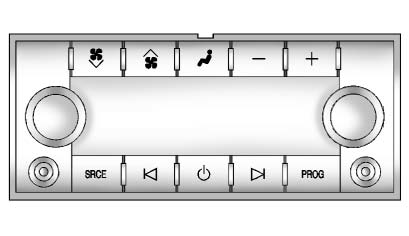
 (Power): Press this button to turn the RSA system on or off.
Volume: Turn the volume control to increase or decrease the sound level for the wired headphones. The left knob controls the left headphone jack, and the right knob controls the right headphone jack.
SRCE (Source): Press this button to select between available audio sources. Depending on the equipment installed in the Buick Enclave, selectable sources may include AM/FM radio, CD, DVD, front auxiliary input, and rear auxiliary input.
 (Seek): Press this control to move to the previous or next radio station and remain on that station. On some radio systems, this function is inactive if the front seat passengers are already listening to the radio.
Press and hold  until the display flashes to tune to an individual station. The display stops flashing if the buttons are not pressed for more than two seconds. On some radio systems, this function is inactive if the front seat passengers are listening to the radio.
While listening to a disc, press  to move to the next track or chapter on the disc. Press
 to return to the start of the current track or chapter, if more than 10 seconds have played. On some radio systems, this function is inactive if the front seat passengers are listening to the disc.
When a DVD video menu is displayed, press
to move the cursor up or down within the menu.
Hold to move the cursor left or right within the DVD menu.
PROG (Program): Press this button to move to the next preset radio station or channel that has been set on the main radio.
On some radio systems, this function is inactive if the front seat passengers are listening to the radio.
When a CD or DVD audio disc is playing, press PROG to return to the beginning of the CD or DVD audio.
On some radio systems, this function is inactive if the front seat passengers are listening to the disc.
When a disc is playing in the CD or DVD changer, press PROG to select the next disc, if multiple discs are loaded. This function may be inactive on some radio systems if the front seat passengers are listening to the same disc source.
When a DVD video menu is displayed, press PROG to perform the ENTER function in the menu. This allows rear passengers to confirm a highlighted DVD menu selection from the RSA controls.
