
Buick Enclave: Radio(s). Satellite Radio. Portable Audio Devices
Radio(s)
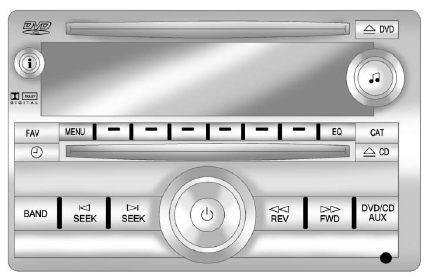
Radio with CD, DVD, and USB Port
 : Press to turn the audio system on or off. Turn the control to increase or decrease the volume.
BAND: Press to select FM, AM, or XM™, if equipped.
 : Select radio stations.
 Seek or scan stations.
 : Change the display between the radio station frequency and the time, if equipped. With the ignition off, press
 to display the time.
For more information about these and other radio features, see Operation.
For vehicles equipped with a Rear Seat Entertainment (RSE) System and Rear Seat Audio (RSA) System, see Rear Seat Entertainment (RSE) System and Rear Seat Audio (RSA) System for additional details.
Storing a Favorite Station
► Up to 36 favorite stations can be stored using the six softkeys located below the radio station frequency tabs and the FAV button. Press FAV to move through as many as six favorite pages, with six stations available on each page.
Each favorites page can store any combination of AM, FM, or XM stations, making it easier to keep preferred stations accessible while driving the Buick Enclave.
See AM-FM Radio.
Setting the Clock
To set the time and date for the radio with CD, DVD, and USB Port:
1. Turn the ignition key to ACC/ACCESSORY or ON/RUN, then press
 to turn the radio on.
2. Press  to display HR, MIN, MM, DD,
YYYY (hour, minute, month, day, and year).
to display HR, MIN, MM, DD,
YYYY (hour, minute, month, day, and year).
3. Press the pushbutton located below the label that needs to be changed.
4. To increase or decrease the selected time or date value, turn
 clockwise or counterclockwise.
For detailed instructions on setting the clock for the specific audio system, see Clock.
Satellite Radio
Vehicles equipped with an XM™ satellite radio tuner and an active XM satellite radio subscription can receive XM programming.
XM Satellite Radio Service
XM is a satellite radio service available in the 48 contiguous United States and 10 Canadian provinces. It offers a wide range of programming, including commercial-free music, coast-to-coast coverage, and digital-quality sound. A subscription fee is required to receive XM service.
For more information, refer to:
► www.xmradio.com or call
1-800-929-2100 (U.S.).
► www.xmradio.ca or call
1-877-438-9677 (Canada).
For more information, see Satellite Radio.
Portable Audio Devices
This vehicle may include an auxiliary input on the radio faceplate and a USB port inside the instrument panel storage area.
External audio devices such as iPods™, laptop computers, MP3 players, CD changers, USB storage devices, and similar equipment can be connected through the 3.5 mm (1/8 in) auxiliary input jack or through the USB port, depending on the audio system installed.
In the Buick Enclave, these connections provide a convenient way to play personal audio through the vehicle speakers without relying only on radio or disc media.
See Auxiliary Devices.
