
Buick Enclave: Bluetooth®. Steering Wheel Controls. Cruise Control
Bluetooth®
The Bluetooth system allows users with a compatible Bluetooth-enabled cell phone to make and receive hands-free calls using the vehicle audio system, microphone, and related controls.
The Bluetooth-enabled phone must be paired with the in-vehicle Bluetooth system before it can be used. Not all phones support every available function, and feature availability can vary by phone model, software version, and service provider.
For safe operation in the Buick Enclave, pair the phone while the vehicle is parked and become familiar with the system before using it on the road.
See Bluetooth.
Steering Wheel Controls
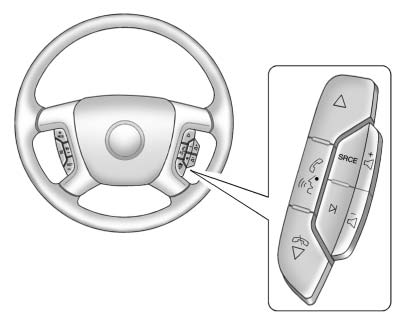
Vehicles with audio steering wheel controls may have different button layouts depending on installed equipment. Some audio functions can be adjusted directly from the steering wheel, helping the driver keep attention on the road.
 Press to select preset or favorite radio stations, choose tracks on a CD/DVD, or select tracks and navigate folders on an iPod® or USB device.
 Press to mute the vehicle speakers. Press again to restore the sound.
For vehicles with Bluetooth or OnStar® systems, press and hold for more than two seconds to interact with those systems.
See Bluetooth and OnStar Overview for more information.
 Press to reject an incoming call or end a current call.
SRCE: Press to switch between radio, CD, and, on equipped vehicles, DVD, front auxiliary, and rear auxiliary sources.
For vehicles with the navigation system, press and hold this button for more than one second to begin voice recognition.
See “Voice Recognition” in the navigation manual for more information.
 Press to go to the next radio station while using AM, FM, or XM™.
Press to go to the next track or chapter when the CD or DVD slot is the active source.
Press to select a track or folder while navigating content on an iPod or USB device.
 Press to increase or decrease the volume.
See Steering Wheel Controls for more information.
Additional Information: Keeping frequently used audio, phone, and source controls within reach helps make everyday driving in the Buick Enclave more comfortable and less distracting.
Cruise Control
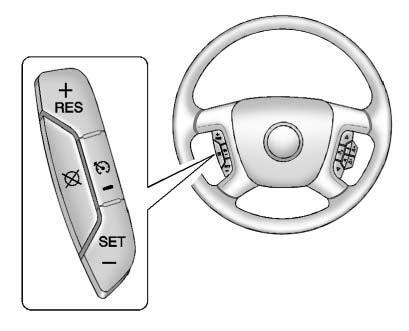
 Press to turn cruise control on or
off. When the system is switched on, the cruise control indicator illuminates.
Press to turn cruise control on or
off. When the system is switched on, the cruise control indicator illuminates.
RES: Press briefly to return the vehicle to a previously set speed, or press and hold to accelerate.
SET– : Press to set the current speed and activate cruise control, or press to gradually reduce the vehicle speed.
 : Press to disengage cruise control
without clearing the stored speed from memory.
: Press to disengage cruise control
without clearing the stored speed from memory.
See Cruise Control.
