
Buick Enclave: Universal Remote System Programming
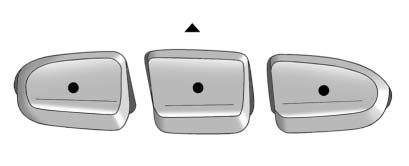
The Universal Remote System in the Buick Enclave provides a convenient way to replace up to three separate hand-held remote control transmitters.
This system can be programmed to operate compatible devices such as garage door openers, gate operators, security systems, and certain home automation devices.
Do not use the Universal Home Remote with any garage door opener that does not have a stop and reverse safety feature. This includes any garage door opener manufactured before April 1, 1982.
Read all instructions completely before attempting to program the Universal Home Remote.
Because the programming process includes several timed steps, it may be helpful to have another person assist you during setup.
Keep the original hand-held transmitter. It may be needed for use with other vehicles, for future programming, or if the Universal Home Remote needs to be reprogrammed later.
For security reasons, it is recommended that all programmed Universal Home Remote buttons be erased when the vehicle is sold or transferred to another owner. See “Erasing Universal Home Remote Buttons” later in this section.
When programming a garage door, park outside the garage.
Park the vehicle directly in line with, and facing, the garage door opener motor-head or gate motor-head. Make sure that people, pets, and objects are clear of the garage door or gate before programming begins.
Installing a fresh battery in the hand-held transmitter is recommended. A stronger transmitter battery can help produce a clearer radio-frequency signal and may make programming quicker and more reliable.
Programming the Universal Home Remote System
For questions or help programming the Universal Home Remote System, call 1-800-355-3515 or go to www.homelink.com.
Programming a garage door opener requires time-sensitive actions, so read the entire procedure before starting. If too much time passes during a step, the device may time out and the procedure will need to be repeated.
To program up to three devices:
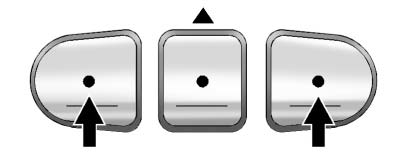
1. From inside the vehicle, press and hold the two outside Universal Home Remote buttons at the same time. Release the buttons only when the indicator light begins to flash, which should occur after about 20 seconds. This step erases the factory settings or all previously programmed buttons.
Do not hold the buttons for longer than 30 seconds. Do not repeat this step when programming the remaining two Universal Home Remote buttons, because repeating it will erase all stored programming.
2. Hold the end of the hand-held transmitter approximately 3 to 8 cm (1 to 3 inches) away from the Universal Home Remote buttons while keeping the indicator light in view. The hand-held transmitter is the transmitter supplied by the manufacturer of the garage door opener receiver or motor-head unit.
3. At the same time, press and hold both the Universal Home Remote button you want to use for the garage door and the button on the hand-held transmitter.
Do not release either the Universal Home Remote button or the hand-held transmitter button until Step 4 has been completed.
Some entry gates and garage door openers may require Step 3 to be replaced with the procedure described in “Gate Operator and Canadian Programming” later in this section.
4. The Universal Home Remote indicator light will flash slowly at first, then flash rapidly after the system has successfully received the frequency signal from the hand-held transmitter. Release both buttons.
5. Press and hold the newly trained Universal Home Remote button and observe the indicator light.
► If the indicator light stays on continuously, programming is complete and the garage door should move when the Universal Home Remote button is pressed and released.
There is no need to continue with programming Steps 6 through 8.
► If the Universal Home Remote indicator light flashes rapidly for two seconds and then changes to a steady light, continue with programming Steps 6 through 8.
For the remaining steps, it may be helpful to have another person assist, because the next part of the procedure must be completed within a limited time.
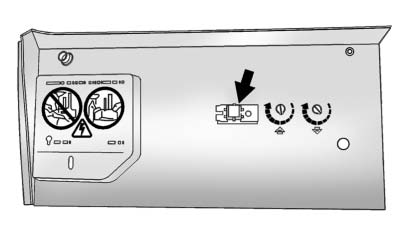
6. After Steps 1 through 5 have been completed, locate the garage door opener receiver inside the garage. This is usually the motor-head unit mounted near the garage ceiling. Find the “Learn” or “Smart” button. The name, color, and position of this button may vary depending on the manufacturer.
7. Firmly press and release the “Learn” or “Smart” button. After pressing this button, you will have 30 seconds to complete Step 8.
8. Immediately return to the Buick Enclave. Firmly press and hold the Universal Home Remote button selected in Step 3 for two seconds, then release it. If the garage door does not move, press and hold the same button a second time for two seconds, then release it. If the door still does not move, press and hold the same button a third time for two seconds, then release it.
The Universal Home Remote should now activate the garage door.
To program the remaining two Universal Home Remote buttons, begin again with Step 2 of “Programming the Universal Home Remote System.” Do not repeat Step 1, because that will erase all previous programming from the Universal Home Remote buttons.
Gate Operator and Canadian Programming
If you have questions or need help programming the Universal Home Remote System, call 1-800-355-3515 or go to www.homelink.com.
Canadian radio-frequency laws require some transmitter signals to time out or stop after several seconds of transmission. This may not be long enough for the Universal Home Remote to capture the signal during standard programming. Some U.S. gate operators are also designed to time out in a similar way.
If you live in Canada, or if you are having difficulty programming a gate operator or garage door opener using the standard “Programming Universal Home Remote” procedure, replace Step 3 under “Programming Universal Home Remote” with the following method.
Continue to press and hold the Universal Home Remote button while pressing and releasing the hand-held transmitter button every two seconds. This cycling action should continue until the frequency signal is successfully accepted by the Universal Home Remote.
The Universal Home Remote indicator light will flash slowly at first and then rapidly once the signal has been accepted. Proceed with Step 4 under “Programming Universal Home Remote” to complete the training procedure for the Buick Enclave.
