
Buick Enclave: Universal Remote System Operation
Using Universal Remote
Press and hold the appropriate Universal Remote button for at least half a second. The indicator light will come on while the signal is being transmitted to the programmed device.
Erasing Universal Remote Buttons
All programmed Universal Remote buttons should be erased when the vehicle is sold, transferred to another owner, or returned at the end of a lease.
To erase all programmed buttons on the Universal Remote device:
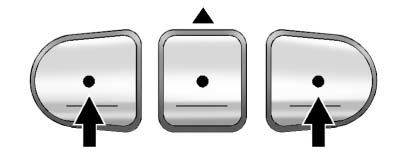
1. Press and hold the two outside buttons until the indicator light begins to flash, which should occur after about 20 seconds.
2. Release both buttons.
Reprogramming a Single Universal Remote Button
To reprogram any one of the three Universal Remote buttons, repeat the programming instructions earlier in this section, beginning with Step 2.
For help or additional information about the Universal Home Remote System, call the customer assistance phone number listed under Customer Assistance Offices (U.S. and Canada) or Customer Assistance Offices (Mexico).
