
Buick Enclave: Ultrasonic Parking Assist. Rear Vision Camera (RVC)
Ultrasonic Parking Assist
If available, the Ultrasonic Rear Parking Assist (URPA) system helps the driver when backing up and parking by providing audible alerts for certain objects behind the vehicle. The system is active while the shift lever is in R (Reverse) and is designed to assist at low speeds, below 8 km/h (5 mph). It is especially useful during slow parking maneuvers, when judging the distance to a wall, post, parked vehicle, or another obstacle behind the rear bumper may be difficult.
URPA uses sensors mounted in the rear bumper to detect objects up to 2.5 m (8 ft) behind the vehicle, as long as the object is at least 25 cm (10 in) off the ground. In the Buick Enclave, this feature is intended to support the driver during reverse movement, but it does not replace careful observation, mirror use, or direct checking around the vehicle.
 WARNING
The URPA system does not detect pedestrians, bicyclists, animals, or any other
objects located below the bumper or that are too close or too far from the vehicle.
To prevent injury, death, or vehicle damage, even with URPA, always check behind
the vehicle and check all mirrors before backing.
The system has limits. Small objects, low obstacles, thin poles, curbs, trailer parts, children’s toys, animals, or items very close to the bumper may not be detected in time. For this reason, always look behind the vehicle, use the mirrors, and back up slowly even when the parking assist tones are working normally.
How the System Works
URPA comes on automatically when the shift lever is moved into R (Reverse). A single tone sounds to indicate the system is working. This tone lets the driver know that the rear parking assist system is active and ready to provide warnings if an object is detected behind the vehicle.
URPA operates only at speeds less than 8 km/h (5 mph). At higher speeds, the system is not intended to function, because parking assist is designed for slow, controlled backing maneuvers rather than normal driving.
An obstacle is indicated by audible beeps. The interval between the beeps becomes shorter as the vehicle gets closer to the obstacle. This changing beep pattern helps the driver understand whether the Buick Enclave is approaching an object gradually or getting very close to it.
When the distance is less than 30 cm (12 in), the beeping changes to a continuous tone for five seconds. A continuous tone means the vehicle is very close to the detected object, and the driver should stop and check the area before continuing to reverse.
To be detected, objects must be at least 25 cm (10 in) off the ground and below liftgate level. Objects must also be within 2.5 m (8 ft) from the rear bumper. This detection distance may be reduced during warmer or humid weather, and performance can also be affected by the shape, size, angle, or surface of the object.
Use the audible alerts as a guide, not as the only source of information. Rear parking assist can help with distance awareness, but it cannot see everything the way a driver can. A careful driver should continue scanning mirrors and surroundings while reversing.
Turning the System On and Off
The system can be disabled through the Driver Information Center (DIC). This may be useful in certain situations where rear objects are expected and repeated alerts are not helpful, such as when a trailer or rear-mounted accessory is present.
See “Park Assist” under Vehicle Personalization for more information.
URPA defaults to the on setting each time the vehicle is started. This means the system is normally ready to assist during the next reverse maneuver unless it is turned off through the available settings.
For normal daily driving and parking, it is recommended to leave the system on. In a vehicle the size of the Buick Enclave, rear parking assist can provide helpful distance feedback when backing into parking spaces, garages, driveways, or tight areas.
When the System Does Not Seem to Work Properly
The following messages may be displayed on the DIC:
SERVICE PARK ASSIST: If this message occurs, take the vehicle to your dealer to repair the system. This message may indicate a fault in the sensors, wiring, control module, or another part of the parking assist system.
PARK ASST BLOCKED SEE OWNERS MANUAL: This message can occur under the following conditions:
► The ultrasonic sensors are not clean. Keep the vehicle's rear bumper free of mud, dirt, snow, ice, and slush. Buildup on the bumper can block the sensors and prevent them from reading the area behind the vehicle correctly. For cleaning instructions, see Exterior Care .► The park assist sensors are covered by frost or ice. Frost or ice can form around and behind the sensors and may not always be visible; this can occur after washing the vehicle in cold weather. The message may not clear until the frost or ice has melted. ► A trailer was attached to the vehicle, or an object was hanging out of the liftgate during the last drive cycle. Once the object is removed, URPA will return to normal operation. Rear-mounted cargo, bike racks, or other accessories may also affect how the sensors read the area behind the vehicle. ► A tow bar is attached to the vehicle. A tow bar or similar equipment can sit within the sensor detection area and cause the system to alert incorrectly or disable normal operation. ► The bumper is damaged.
Take the vehicle to your dealer to repair the system. A damaged bumper can change sensor position or alignment, which may reduce accuracy even if the sensors appear to be intact.
► Other conditions, such as vibrations from a jackhammer or the compression of air brakes on a very large truck, are affecting system performance.Environmental noise, vibration, weather, and nearby equipment can interfere with ultrasonic sensor operation. If the message appears temporarily and then clears after conditions change or the rear bumper is cleaned, the system may return to normal. If the message remains, the Buick Enclave should be inspected so the parking assist system can operate as intended.
Before relying on the system, make sure the rear bumper area is clean and undamaged. During winter, after off-road driving, or after traveling through mud or heavy rain, wipe the sensor area if alerts seem delayed, false, or missing. Clean sensors help the system provide more consistent parking assistance.
Rear Vision Camera (RVC)
The vehicle may be equipped with a Rear Vision Camera (RVC) system. Read this entire section before using the feature so you understand what the camera can show, what it cannot show, and how it should be used during backing and parking maneuvers.
The RVC system is a driver-assistance feature for low-speed reverse movement. In the Buick Enclave, it can make parking, backing into a driveway, or positioning the vehicle near a garage wall easier by showing a rearward view, but it should always be used together with mirrors, direct visual checks, and careful driver judgment.
WARNING
The RVC system does not display pedestrians, bicyclists, animals, or any other
object located outside the cameras field of view, below the bumper, or under the
vehicle.
Do not back the vehicle using only the RVC screen or by using the screen during longer, higher speed backing maneuvers, or where there could be cross-traffic. Perceived distances may be different from actual distances. Failure to use proper care before backing may result in injury, death, or vehicle damage. Always check before backing by checking behind and around the vehicle.
The camera view has natural limits. Objects may be hidden below the bumper, positioned at the outer edges of the camera angle, located under the vehicle, or too close to be shown clearly. Low light, glare, rain, snow, dirt on the lens, and the shape or height of an object can also affect what appears on the screen. Before backing, check the area around the vehicle and reverse slowly enough to stop immediately if something appears.
Vehicles without Navigation System
The rear vision camera system is designed to help the driver when backing up by displaying a view of the area behind the vehicle. When the key is in the ON/RUN position and the driver shifts the vehicle into R (Reverse), the video image automatically appears on the inside rear view mirror.
This mirror-mounted display provides a convenient rear image during parking and short reverse maneuvers. It can be helpful when aligning the vehicle in a parking space, backing toward a driveway entrance, or checking the distance to larger objects behind the rear bumper. Once the driver shifts out of R (Reverse), the video image automatically disappears from the inside rear view mirror.
Because the Buick Enclave has a wide rear body area, the camera image is useful for rear awareness, but side clearance still needs attention. Check both outside mirrors and look around the vehicle when backing near curbs, posts, shopping carts, garage openings, or other parked vehicles.
Turning the Rear Vision Camera System Off or On
To turn off the rear vision camera system, press and hold
 , located on the inside rearview mirror,
until the left indicator light turns off.
, located on the inside rearview mirror,
until the left indicator light turns off.
The rear vision camera display is now disabled.
To turn the rear vision camera system on again, press and hold
 until the left indicator light illuminates.
The rear vision camera system display is now enabled and the display will appear
in the mirror normally.
until the left indicator light illuminates.
The rear vision camera system display is now enabled and the display will appear
in the mirror normally.
If the display has been turned off, it may not appear the next time the vehicle is shifted into R (Reverse). Before relying on the camera image, confirm that the system is enabled and that the mirror display is operating normally.
Vehicles with Navigation System
The rear vision camera system is designed to help the driver when backing up by displaying a view of the area behind the vehicle on the navigation screen. The larger navigation display can make the image easier to read, especially when making small parking corrections or backing into tighter spaces.
When the driver shifts the vehicle into R (Reverse), the video image automatically appears on the navigation screen. Once the driver shifts out of R (Reverse), the navigation screen will go back to the last screen that had been displayed, after a delay.
This short delay can be useful during parking adjustments, such as shifting between Reverse and Drive while straightening the vehicle. The image should still be treated as a reference view, not as the only guide for movement.
Turning the Rear Vision Camera System On or Off
To turn the rear vision camera system on or off:
1. Shift into P (Park).
2. Press the MENU button to enter the configure menu options, then press the MENU hard key to select Display or touch the Display screen button.
3. Select the Rear Camera Options screen button. The Rear Camera Options screen displays.
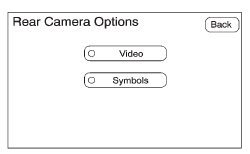
4. Select the Video screen button.
When the Video screen button is highlighted the RVC system is on.
The delay received after shifting out of R (Reverse) is approximately 10 seconds. The delay can be canceled by performing one of the following:
► Pressing a hard key on the navigation system. ► Shifting into P (Park). ► Reach a vehicle speed of 8 km/h (5 mph).There is a message on the rear vision camera screen that states “Check Surroundings for Safety.”
This message should be treated as part of the normal backing routine. Before moving, look for pedestrians, children, animals, low objects, cross-traffic, and anything near the sides of the vehicle that may not be obvious in the camera image.
Adjusting the Brightness and Contrast of the Screen
To adjust the brightness and contrast of the screen, press the MENU button while the rear vision camera image is on the display.
Any adjustments made will only affect the rear vision camera screen. These settings can help improve visibility in different lighting conditions, such as bright daylight, shaded parking areas, garages, or nighttime use.
 (Brightness): Touch the + (plus)
or – (minus) screen buttons to increase or decrease the brightness of the screen.
(Brightness): Touch the + (plus)
or – (minus) screen buttons to increase or decrease the brightness of the screen.
 (Contrast): Touch the + (plus)
or – (minus) screen buttons to increase or decrease the contrast of the screen.
(Contrast): Touch the + (plus)
or – (minus) screen buttons to increase or decrease the contrast of the screen.
Set the image so the rear view is clear without losing detail. Too much brightness can wash out objects at night, while too little brightness can make shaded areas difficult to read. Proper contrast can make edges, pavement markings, walls, and larger obstacles easier to distinguish.
If the rear camera image appears blurry, dark, washed out, or distorted after adjustment, inspect the camera lens area for dirt, snow, ice, water spots, or road film. Clean the lens carefully when needed. If the image still does not appear normal, the Buick Enclave rear vision camera system may need inspection or service.
Symbols
The navigation system may include a feature that allows the driver to view caution symbols on the navigation screen while using the rear vision camera. These symbols are designed to work together with the rear camera image and the Ultrasonic Rear Park Assist (URPA) system to help identify certain detected objects behind the vehicle.
The Ultrasonic Rear Park Assist (URPA) system must not be disabled if the driver wants to use the caution symbols. The symbols rely on information from URPA, so if that system is turned off, the navigation screen may not be able to display the parking assist symbols correctly.
If URPA has been disabled and the symbols have been turned on, the Rear Parking Assist Symbols Unavailable error message may display. See Ultrasonic Parking Assist .
The symbols appear when an object has been detected by the URPA system. Depending on the position of the object and the camera angle, the symbol may cover the object while viewing the navigation screen. For this reason, the driver should use the symbols as a warning aid, not as the only way to judge distance or location.
In the Buick Enclave, the rear camera symbols can be useful during low-speed parking, backing into a driveway, or maneuvering near larger objects. However, the driver should still check mirrors, look around the vehicle, and move slowly enough to stop immediately if something is detected.
To turn the symbols on or off:
1. Make sure that URPA has not been disabled.
2. Shift into P (Park).
3. Press the MENU hard key to enter the configure menu options, then press the MENU hard key repeatedly until Display is selected or touch the Display screen button.
4. Select the Rear Camera Options screen button. The Rear Camera Options screen will display.
5. Touch the Symbols screen button. The screen button will be highlighted when on.
If the symbols do not appear when expected, first confirm that URPA is active and that the rear parking assist sensors are clean and unobstructed. A disabled park assist system, blocked sensors, or a system message on the Driver Information Center can prevent the symbols from displaying normally.
Rear Vision Camera Error Messages
Service Rear Vision Camera System: This message can display when the system is not receiving information it requires from other vehicle systems. The rear vision camera may depend on signals from other modules or vehicle functions, so a communication issue can affect the display or related camera features.
If any other problem occurs or if a problem persists, see your dealer. Continued camera errors should not be ignored, especially if the image is missing, delayed, distorted, or unreliable during reverse operation.
When an error message appears, use extra caution while backing. The camera system may not provide a usable rear view, and the driver should rely on mirrors, direct checks, and careful low-speed movement until the issue is resolved.
Rear Vision Camera Location
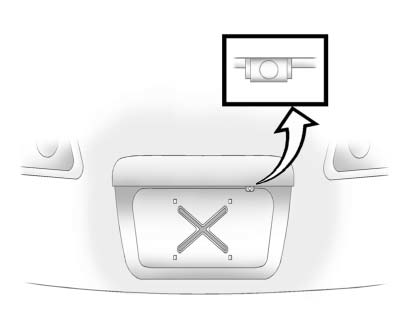
The camera is located above the license plate. This position gives the system a view of the area directly behind the vehicle and helps the driver see objects that may be difficult to judge from the driver seat alone.
The area displayed by the camera is limited and does not display objects that are close to either corner or under the bumper. Objects at the far left or right of the rear bumper, very low obstacles, or items directly below the bumper may be outside the camera image.
The area displayed can vary depending on vehicle orientation or road conditions. If the vehicle is on a hill, angled driveway, uneven pavement, or a rough surface, the camera view may look different from what the driver expects. The distance of the image that appears on the screen differs from the actual distance, so do not rely only on the screen to judge how close the Buick Enclave is to an object.
The following illustration shows the field of view that the camera provides.
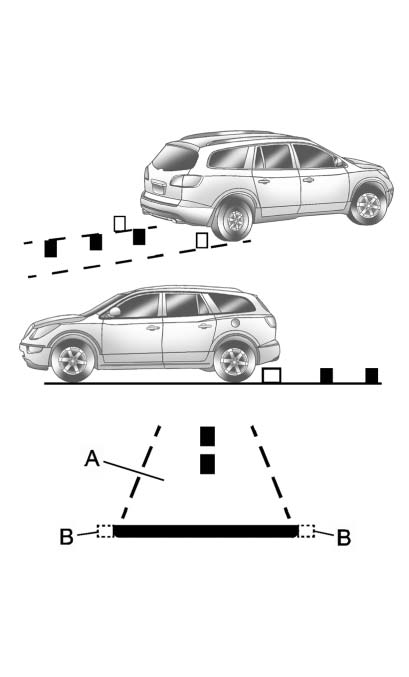
A. View displayed by the camera.
B. Corner of the rear bumper.
This illustration helps explain why the camera image should be used together with other checks. The camera can show the central rear area, but it may not show every side object, low obstacle, or object close to the rear corners.
When the System Does Not Seem To Work Properly
The rear vision camera system might not work properly or display a clear image if:
► The RVC is turned off.See “Turning the Rear Camera System On or Off” earlier in this section.
► It is dark. ► The sun or the beam of headlights is shining directly into the camera lens.► Ice, snow, mud, or anything else builds up on the camera lens.
Clean the lens, rinse it with water, and wipe it with a soft cloth. Avoid harsh scraping, abrasive materials, or strong chemicals that could damage the lens surface. A clean camera lens is important for a clear rear image, especially after driving in rain, snow, road salt, dust, or mud.
► The back of the vehicle is in an accident. The position and mounting angle of the camera can change or the camera can be affected. Be sure to have the camera and its position and mounting angle checked at your dealer. ► There are extreme temperature changes.Large temperature changes can affect electronic components and display behavior temporarily. Moisture, condensation, heat, or freezing conditions may also reduce image clarity until conditions return to normal.
The rear vision camera system display in the rearview mirror may turn off or not appear as expected due to one of the following conditions. If this occurs the left indicator light on the mirror will flash.
► A slow flash may indicate a loss of video signal, or no video signal present during the reverse cycle. ► A fast flash may indicate that the display has been on for the maximum allowable time during a reverse cycle, or the display has reached an Over Temperature limit.
The fast flash conditions are used to protect the video device from high temperature conditions. Once conditions return to normal the device will reset and the green indicator will stop flashing.
During any of these fault conditions, the display will be blank and the indicator will continue to flash as long as the vehicle is in R (Reverse) or until the conditions return to normal.
Pressing and holding  when the left
indicator light is flashing will turn off the video display along with the left
indicator light.
when the left
indicator light is flashing will turn off the video display along with the left
indicator light.
If the display turns off or the indicator continues flashing, use the Buick Enclave mirrors and direct visual checks while backing until the camera returns to normal operation. If the problem repeats, have the system inspected so the rear vision camera can provide a reliable image when needed.
For best performance, keep the camera area clean, check the display before relying on it, and remember that the rear vision camera is only one part of safe backing. Careful observation, slow movement, and awareness of the vehicle’s rear corners remain essential.
