
Buick Enclave: Remote Keyless Entry (RKE) System. Remote Vehicle Start. Liftgate
Remote Keyless Entry (RKE) System
The Remote Keyless Entry transmitter is used to lock and unlock the doors of the Buick Enclave from up to 60 m (195 ft) away from the vehicle. Actual range may vary depending on surroundings, battery condition, and nearby interference.
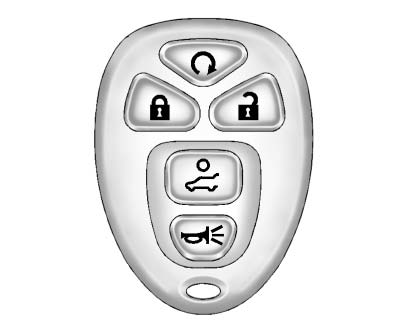
Press  to unlock the driver door.
Press  again within five seconds to unlock all remaining doors.
Press  to lock all doors.
Lock and unlock feedback can be personalized through the vehicle settings when this feature is available.
To open or close the liftgate, press and hold
 until the liftgate begins to move.
Press  and release to locate the vehicle.
Press  and hold for more than two seconds to sound the panic alarm.
Press  again to cancel the panic alarm.
See Remote Keyless Entry (RKE) System Operation.
If the transmitter range becomes noticeably shorter, check the battery condition first. A weak transmitter battery can make Buick Enclave remote locking, unlocking, liftgate operation, and vehicle locator functions less consistent.
Remote Vehicle Start
Starting the Vehicle
With the remote start feature, the engine can be started while you are outside the Buick Enclave. This is especially convenient when you want the cabin to begin warming or cooling before entering the vehicle.
1. Aim the RKE transmitter toward the vehicle.
2. Press and release 
3. Immediately after completing Step 2, press and hold
 until the parking lamps flash.
When the engine starts, the parking lamps will turn on and stay illuminated while the engine is running.
The doors remain locked, and the climate control system may activate automatically, depending on vehicle settings and outside temperature.
The engine will run for 10 minutes. The same procedure can be repeated once to add another 10-minute extension. Remote start can only be extended one time per start cycle.
Canceling a Remote Start
To cancel a remote start:
► Aim the RKE transmitter at the vehicle
and press and hold until the parking
lamps turn off.
► Turn on the hazard warning flashers.
► Turn the ignition switch on and then off.
See Remote Vehicle Start.
Door Locks
To lock or unlock a door manually:
► From inside the vehicle, use the door lock knob located on the window sill.
► From outside the Buick Enclave, turn the key toward the front or rear of the vehicle, or press
the or
button on the Remote Keyless Entry
(RKE) transmitter.
Power Door Locks
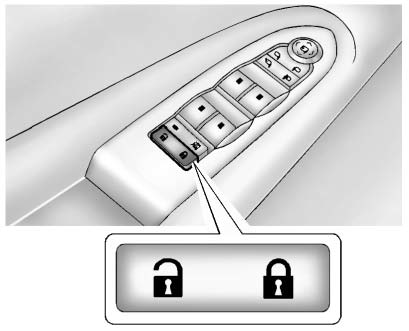
: Press to unlock the doors.
: Press to lock the doors.
See Power Door Locks.
Liftgate
To open the liftgate, the vehicle must be in P (Park). Press the touch pad located under the liftgate handle. To close it manually, use the pull cup or pull strap to guide the liftgate downward in a controlled motion.
Power Liftgate
On Buick Enclave models equipped with a power liftgate, the vehicle must also be in P (Park) before the system will operate.
► Press and hold  on the Remote Keyless
Entry (RKE) transmitter.
on the Remote Keyless
Entry (RKE) transmitter.
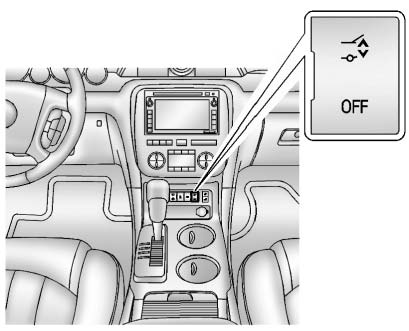
► Press the liftgate button on the center console.
► Press the touch pad switch on the outside liftgate handle.
For more information, see Liftgate.
