
Buick Enclave: OnStar Overview
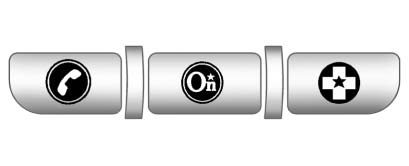
If equipped, this vehicle has a comprehensive in-vehicle system that can connect to a live Advisor for Emergency, Security, Navigation, Connection, and Diagnostic Services. OnStar is designed to provide direct assistance from inside the vehicle, helping drivers request help, receive directions, check certain vehicle systems, or communicate during an emergency.
OnStar features and availability may depend on the vehicle equipment, active service plan, cellular network coverage, GPS signal availability, and regional service conditions. For a Buick Enclave owner, the system can be a useful support feature during daily driving, long trips, unfamiliar routes, or unexpected roadside situations.
Overview
The OnStar system status light is next to the OnStar buttons. This light gives a quick visual indication of the system’s current condition. If the status light is:
► Solid Green: System is ready and available for use, subject to service plan and signal availability.. Flashing Green: The system is on a call or actively connected.
. Red: Indicates a problem that may require attention or service.
If the light shows a concern or if the system does not respond as expected, the vehicle may need to be checked to confirm that the OnStar hardware, account status, and communication systems are operating properly.
Push  or call 1-888-4-ONSTAR (1-888-466-7827)
to speak to an Advisor. An Advisor can help with account questions, certain vehicle services, route guidance where available, roadside assistance requests, and other supported OnStar features.
or call 1-888-4-ONSTAR (1-888-466-7827)
to speak to an Advisor. An Advisor can help with account questions, certain vehicle services, route guidance where available, roadside assistance requests, and other supported OnStar features.
Push  to:
to:
Requires the available Directions and Connections service plan. Voice command operation can help reduce distraction when used properly, but the driver should always keep attention on the road and use the system only when it is safe to do so.
Push to connect to a live Advisor
to:
On-Demand Diagnostics can provide useful information about certain vehicle systems, but it does not replace regular maintenance or a physical inspection when a warning light, unusual noise, leak, vibration, or drivability concern is present.
Push  to get a priority connection
to an Emergency Advisor available 24/7 to:
to get a priority connection
to an Emergency Advisor available 24/7 to:
The emergency connection is intended for serious situations where quick assistance is needed, such as a crash, medical emergency, dangerous road condition, or other urgent event. When using this feature, clearly explain the situation, vehicle location, and whether anyone is injured or in immediate danger.
