
Buick Enclave: Memory Seats. Heated and Ventilated Front Seats
Memory Seats
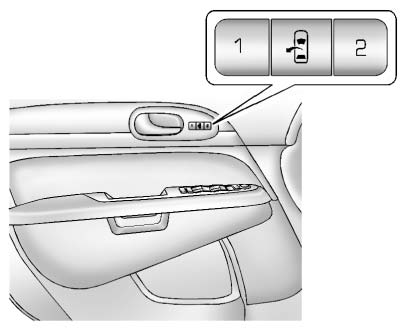
On vehicles equipped with the memory feature, the controls on the driver door are used to store and recall preferred positions for the driver seat, outside mirrors, and power steering column, if available.
Storing Memory Positions
To save a position into memory:
1. Adjust the driver seat and seatback recliner, both outside mirrors, and the power steering column, if available.
See Power Mirrors and Steering Wheel Adjustment for more information.
Not all vehicles have the ability to save and recall mirror positions.
2. Press and hold “1” until two beeps sound.
3. Repeat the procedure for a second driver position using “2.” To recall a saved position, press and release “1”
or “2.” The vehicle must be in P (Park). A single beep will sound.
The seat, outside mirrors, and power steering column, if available, will move to the positions previously stored for the selected driver.
Memory Remote Recall
The memory feature can return the driver seat, outside mirrors, and power steering column, if available, to stored positions when the driver enters the vehicle.
To activate this function, unlock the driver door with the Remote Keyless Entry (RKE) transmitter. The driver seat, outside mirrors, and power steering column will move to the memory positions associated with the transmitter used to unlock the Buick Enclave.
This feature can be turned on or off through the vehicle personalization menu.
See “Memory Seat Recall” under Vehicle Personalization for more information.
To stop recall movement, press one of the power seat controls, memory buttons, power mirror buttons, or the power steering column control, if available.
If an object blocks the driver seat and/or steering column while a memory position is being recalled, the movement may stop. Remove the obstruction, then press and hold the appropriate manual control for the memory item that did not recall for two seconds. Try recalling the memory position again by pressing the proper memory button.
If the memory position still does not recall correctly, see your dealer for service.
Easy Exit Positions
The easy exit feature can move the driver seat rearward and, if equipped, move the power steering column up and forward to create more room when exiting the Buick Enclave.
 (Easy Exit Positions): Press to
recall the easy exit positions.
(Easy Exit Positions): Press to
recall the easy exit positions.
The vehicle must be in P (Park).
If the easy exit feature is enabled in the vehicle personalization menu, automatic driver seat and power steering column movement occurs when the ignition key is removed.
► A single beep sounds. The driver seat moves rearward approximately 8 cm (3 in), and the power steering column, if available, moves up and forward. To move the seat farther back, press the easy exit seat button again until the seat reaches the full rearward position.
If something blocks the driver seat while the exit position is being recalled, the movement may stop. Remove the obstruction, then press and hold the power seat control rearward for two seconds. Try recalling the exit position again. If the exit position still does not recall, see your dealer for service.
See “Easy Exit Seat” under Vehicle Personalization for more information.
For shared Buick Enclave use, memory seats are especially useful because each regular driver can keep a comfortable position saved and restore it without manually readjusting the seat, mirrors, and steering column every time.
Heated and Ventilated Front Seats
 WARNING
If you cannot feel temperature changes or pain on the skin, the seat heater may cause burns, even when it is operating at lower temperature settings.
To reduce the risk of burns, anyone with this condition should use extra care when using the heated seat feature, especially for extended periods. Do not place anything on the seat that can trap heat, such as a blanket, cushion, seat cover, or similar item. These materials can cause the seat heater to overheat.
An overheated seat heater may burn the occupant or damage the seat material.
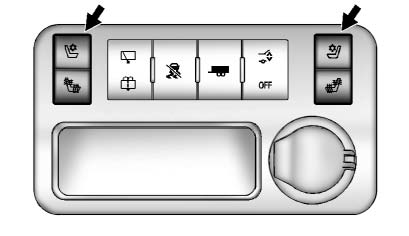
Heated and Cooled Seat Buttons Shown, Heated Seat Buttons Similar
If equipped, the heated and ventilated front seat buttons are located on the center console. The engine must be running for these comfort features to operate.
 (Heated Seatback): If available,
press to heat the seatback only.
(Heated Seatback): If available,
press to heat the seatback only.
 (Cooled Seat): If available, press
to cool the entire seat.
(Cooled Seat): If available, press
to cool the entire seat.
 (Heated Seat and Seatback):
Press to heat both the seat cushion and the seatback.
Press the button once to select the highest setting. Each additional press moves the seat to the next lower setting and then to off. The indicator lights show the selected level: three lights indicate the highest setting, and one light indicates the lowest setting.
The passenger heated seat may take slightly longer to warm up.
The heated and/or cooled seat functions are canceled when the ignition is turned off.
Remote Start Heated Seats
When outside temperatures are cold, the heated seats may turn on automatically during a remote vehicle start.
The heated seats are canceled when the ignition is turned on.
After the vehicle is started normally, press the desired heated seat button to continue using the heated seat feature.
The heated seat button indicator lights do not turn on during a remote start.
The temperature of an unoccupied seat may be lower than the temperature of an occupied seat.
See Remote Vehicle Start for more information.
In the Buick Enclave, the heated and ventilated seat functions are intended to improve comfort, but they should be used thoughtfully. Adjust the setting as needed rather than leaving the seat on high for longer than necessary.
