
Buick Enclave: Instrument Panel Illumination Control. Courtesy Lamps. Dome Lamps
Instrument Panel Illumination Control
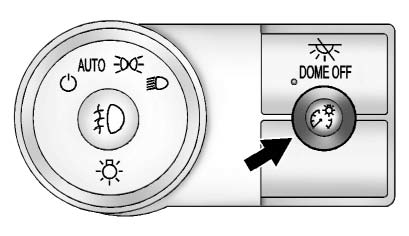
The instrument panel brightness knob is located on the instrument panel to the left of the steering column.
 (Instrument Panel Brightness): Push the knob in all the way until it extends outward, then turn the knob clockwise or counterclockwise to brighten or dim the instrument panel lights. Push the knob back in when the adjustment is complete.
Courtesy Lamps
The courtesy lamps turn on automatically when a door is opened.
The lamps can also be turned on manually by turning the instrument panel brightness control fully clockwise.
The reading lamps, located in the headliner above the rearview mirror, can be turned on or off independently of the automatic courtesy lamps when the doors are closed.
Dome Lamps
The dome lamps are located in the overhead console and above the rear seat passenger area.
Interior lighting in the Buick Enclave is designed to make entry, exit, and passenger-area visibility easier during low-light conditions.
The dome lamps come on when a door is opened, unless the dome lamp override button has been pressed in.
The lamps can also be turned on and off by turning the instrument panel brightness control clockwise to the farthest position.
Dome Lamp Override
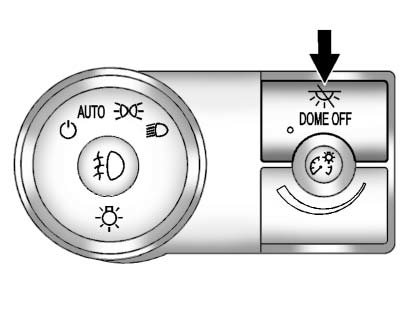
The dome lamp override button is located next to the exterior lamp control.
 DOME OFF (Dome Lamp Override): Press the top of the button in to keep the dome lamps off when a door is opened.
An indicator light on the button comes on to show that the dome lamps are off. Press near the bottom of the button to allow the dome lamps to come on again when a door is opened.
