
Buick Enclave: Dual Automatic Climate Control System
The Buick Enclave dual automatic climate control system manages heating, cooling, airflow direction, and ventilation for the cabin. This system is designed to help maintain a comfortable interior temperature while giving the driver and front passenger separate temperature adjustment options.
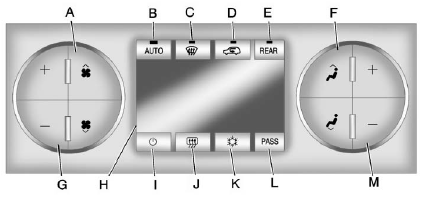
A. Fan Control
B. AUTO (Automatic Operation)
C. Defrost
D. Recirculation
E. REAR (Rear Climate Control)
F. Air Delivery Mode Control
G. Driver Side Temperature Control
H. Display
I. Power (On/Off)
J. Rear Window Defogger
K. Air Conditioning
L. PASS (Passenger)
M. Passenger Side Temperature Control
Display Function
Each time the temperature, air delivery mode, or fan control buttons are pressed, the climate control display shows the selected function together with the current interior temperature setting. The outside temperature is shown separately on the instrument panel cluster.
 (On/Off): Press this button to turn the climate control system on or off.
When the system is turned off, outside air can still enter the cabin through the floor outlets. The air delivery mode can still be adjusted, even though full climate control operation is not active.
The Buick Enclave climate control system also turns on automatically if the fan control, defrost, AUTO, or air conditioning button is pressed.
Automatic Operation
AUTO (Automatic): In automatic operation, the system controls the interior temperature, air delivery mode, and fan speed without requiring constant manual adjustment.
To use automatic mode:
1. Press the AUTO button.
When AUTO is selected, the display shows the selected temperature setting or settings, along with AUTO. The current air delivery mode and fan speed also appear briefly for approximately five seconds.
When AUTO is active, the air conditioning and air inlet selection are controlled automatically by the system.
The air conditioning operates when the outside temperature is above 4°C (40°F). The system normally selects outside air, but if the outside temperature is high, it may switch to recirculation mode to help cool the cabin more quickly.
The recirculation indicator light turns on when recirculation mode is active.
2. Set the desired temperature for the driver and passenger.
To find a comfortable setting, begin with 22°C (73°F) and allow about 20 minutes for the system to stabilize the cabin temperature. Use the driver side or passenger side temperature buttons to fine-tune the setting as needed. Once selected, the system maintains that temperature as closely as possible.
Choosing the warmest or coolest temperature setting does not make the Buick Enclave heat or cool faster. The system still works at its normal capacity and adjusts airflow based on conditions.
To help avoid blowing cold air during cold weather, the system may delay fan operation until warmer air is available. Press the fan control if you want to override this delay and manually select the fan speed.
Temperature Control
The driver and passenger side temperature buttons adjust the temperature of the air delivered through the system. The temperature can be adjusted even when the system is off, because outside air can still enter the vehicle unless recirculation mode is selected.
See “Recirculation” later in this section.
Driver Side Temperature
Control: Press the + or − buttons to increase or decrease the driver side temperature setting. The driver side temperature display shows the selected temperature.
Passenger Side Temperature
Control: Press the + or − buttons to increase or decrease the passenger side temperature setting.
The passenger side display shows the selected temperature for the passenger side of the cabin.
PASS (Passenger): Press this button to match the passenger temperature setting to the driver temperature setting. The PASS indicator turns off when both settings are the same. When the passenger temperature setting is different from the driver setting, the PASS indicator turns on.
Manual Operation
The air delivery mode and fan speed can be adjusted manually when the driver or passenger wants direct control instead of full automatic operation.
 (Fan Control): Press this control to increase or decrease the fan speed.
Pressing  while automatic operation is active places the fan speed under manual control.
The air delivery mode remains under automatic control. The fan setting still appears on the display, but the word AUTO no longer appears, and the AUTO button indicator light turns off.
 (Air Delivery Mode Control): Press this button to change the direction of airflow inside the vehicle.
Repeatedly press  until the desired mode appears on the display. Pressing a mode button while the system is off changes the air delivery mode without turning the system on. Pressing a mode button during automatic operation places the air delivery mode under manual control.
The selected air delivery mode remains shown on the display, but the word AUTO no longer appears, and the AUTO button indicator light turns off.
 (Vent): Air is directed through the instrument panel outlets.
 (Bi-Level): Air is divided between the instrument panel outlets and the floor outlets. Some air is also directed toward the windshield and side window outlets. Cooler air is directed to the upper outlets, while warmer air is directed to the floor outlets for balanced comfort.
 (Floor): Air is directed mainly to the floor outlets, with some airflow directed to the windshield, side window outlets, and second row floor outlets. In this mode, the system uses outside air.
 (Defog): This mode helps clear fog or moisture from the windows. Air is directed to the windshield, floor outlets, and side window vents to improve visibility and cabin comfort.
When this mode is selected, the system turns off recirculation and runs the air conditioning compressor unless the outside temperature is below 4°C (40°F). For safety and visibility, do not drive the Buick Enclave until the windshield and all side windows are clear.
 (Defrost): Press this button to turn defrost on or off. This mode quickly clears fog, frost, or moisture from the windshield.
Air is directed to the windshield, side window outlets, and floor vents to help restore clear visibility throughout the front cabin area.
In this mode, outside air is brought into the vehicle to help remove moisture from the glass.
The air conditioning system runs automatically in this setting unless the outside temperature is below 4°C (40°F).
Do not drive the vehicle until all windows are clear.
While in defrost mode, if the PASS button is pressed, the PASS button indicator flashes three times to show that the passenger climate control system cannot be activated separately. If the passenger temperature buttons are adjusted while defrost is active, the driver temperature indicator changes instead.
The passenger temperature setting is not displayed while defrost mode is active.
When the system returns to bi-level, vent, or floor mode, the previous separate temperature settings are displayed again instead of any temporary change made while defrost mode was operating.
Air Conditioning
 (Air Conditioning): Press this button to turn the air conditioning (A/C) on or off. An indicator light comes on when A/C is active.
The A/C system does not operate when the outside temperature is below 4°C (40°F). If
is pressed when A/C operation is not available, the indicator flashes three times and then turns off. If A/C is already on and the outside temperature drops below the temperature where air conditioning is effective, the A/C indicator turns off to show that A/C mode has been canceled.
On hot days, open the windows briefly before using the climate control system to let hot air escape from the cabin.
This can help reduce the time required to cool the interior of the Buick Enclave and improve initial comfort for passengers.
The air conditioning system removes moisture from the air. Because of this, water may drip under the vehicle while it is idling or shortly after the engine is turned off. This is normal operation and does not indicate a problem.
 (Recirculation): Press this button to turn recirculation mode on or off.
An indicator light comes on when recirculation is active. When the engine is turned off, recirculation mode automatically turns off and must be selected again after the engine is restarted.
This mode recirculates air inside the vehicle and helps cool the cabin more quickly. It can also help reduce the amount of outside air, dust, traffic fumes, or odors entering the cabin.
Recirculation mode cannot be used with floor, defog, or defrost modes. If recirculation is selected while one of these modes is active, the indicator flashes three times and then turns off.
The air conditioning compressor also turns on when recirculation mode is activated. In cold or damp weather, using recirculation for too long can cause the windows to fog.
To clear fog from the windows, select either defog or defrost mode and increase the fan speed as needed.
REAR: Press this button to turn the rear heating and air conditioning system on or off. See Rear Climate Control System (Rear Climate Control Only) or Rear Climate Control System (Rear Climate with Rear Seat Audio).
Rear Window Defogger
The rear window defogger uses an electric warming grid built into the rear glass to remove fog, frost, or light moisture from the rear window.
 (Rear Window Defogger):
Press this button to turn the rear window defogger on or off. The rear window defogger remains on for about 10 minutes before shutting off automatically.
The defogger also turns off when the engine is turned off. Do not drive the vehicle until all windows are clear and visibility is safe.
For vehicles equipped with heated outside rearview mirrors, pressing the rear window defogger button also helps clear fog or frost from the mirror surfaces.
Notice: Do not use a razor blade or any sharp object to clear the inside of the rear window. Do not attach anything to the defogger grid lines in the rear glass. These actions can damage the rear defogger, and repairs would not be covered by the vehicle warranty.
Sensors
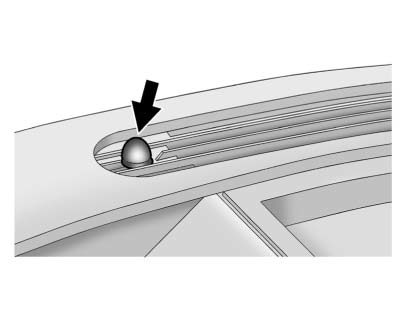
The solar sensor is located in the defrost grille near the center of the instrument panel. It monitors sunlight and solar heat entering the cabin. Do not cover the solar sensor, because blocked sensor readings can prevent the automatic climate control system from operating correctly.
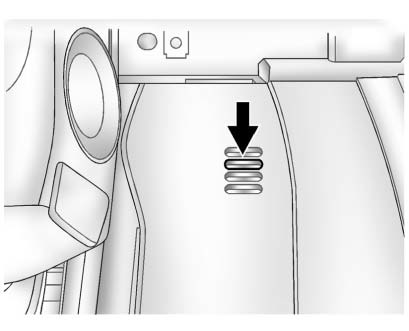
The interior temperature sensor, located on the instrument panel to the right of the steering column, measures the temperature of the air inside the vehicle.
There is also an exterior temperature sensor located behind the front grille. This sensor reads outside air temperature and helps the Buick Enclave climate control system maintain the selected cabin temperature. Any cover installed on the front of the vehicle could cause an inaccurate outside temperature reading.
The climate control system uses information from these sensors to help maintain comfort settings by adjusting temperature, fan speed, and air delivery mode.
The system may also supply cooler air to the side of the vehicle exposed to stronger sunlight. Recirculation mode may be used automatically when needed to help maintain cooler outlet temperatures and improve cabin comfort.
