
Buick Enclave: Cruise Control
With cruise control, a speed of about 40 km/h (25 mph) or more can be maintained without keeping your foot on the accelerator pedal. This feature is intended for steady road conditions where traffic is flowing smoothly and the driver can safely maintain a consistent speed. Cruise control does not work at speeds below about 40 km/h (25 mph).
When the brakes are applied, the cruise control is disengaged. This allows the driver to immediately take back full control of vehicle speed whenever slowing, stopping, or reacting to traffic conditions is necessary.
In the Buick Enclave, cruise control is a convenience feature for longer drives, open highways, and steady-speed travel. It can reduce foot fatigue during extended trips, but it should only be used when road, traffic, and weather conditions make constant-speed driving safe.
 WARNING
Cruise control can be dangerous where you cannot drive safely at a steady speed.
So, do not use the cruise control on winding roads or in heavy traffic.
Cruise control can be dangerous on slippery roads. On such roads, fast changes in tire traction can cause excessive wheel slip, and you could lose control. Do not use cruise control on slippery roads.
Do not use cruise control in rain, snow, ice, fog, heavy traffic, construction zones, city driving, winding roads, or any situation where speed must be changed often. The driver must remain alert and ready to brake, steer, or cancel cruise control at any time.
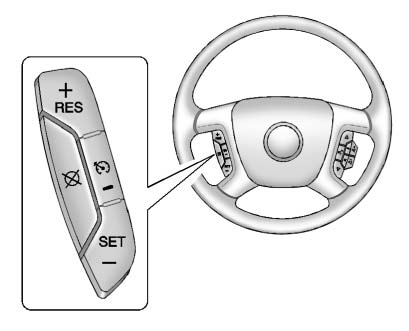
The cruise control buttons are located on left side of the steering wheel. This placement allows the driver to operate the system without reaching away from the normal driving position.
 (On/Off): Press to turn cruise control on and off. The indicator comes on when cruise control is on.
Press briefly to make the vehicle resume to a previously set speed, or press and hold to accelerate. This control is useful after cruise control has been temporarily disengaged by braking, as long as road conditions still allow steady-speed driving.
SET– : Press to set the speed and activate cruise control or to make the vehicle decelerate. This button allows the driver to choose the current speed as the cruise speed or reduce the selected speed while cruise control is already active.
 (Cancel): Press to disengage cruise control without erasing the set speed from memory.
Setting Cruise Control
If the cruise button is on when not in use, it could get bumped and go into cruise when not desired. Keep the cruise control switch off when cruise is not being used. This helps prevent accidental activation and keeps the driver fully in control of speed selection.
The cruise control light on the instrument panel cluster comes on after the cruise control has been set to the desired speed. The light confirms that the system is maintaining the selected speed.
1. Press the button to turn the cruise control system on.
2. Get up to the speed desired.
3. Press and release the SET– button located on the steering wheel.
4. Take your foot off the accelerator.
After the speed is set, keep both hands on the steering wheel and continue watching traffic. Cruise control maintains speed, but it does not steer the vehicle, judge traffic, or choose a safe following distance.
Resuming a Set Speed
If the cruise control is set at a desired speed and then the brakes are applied, the cruise control is disengaged without erasing the set speed from memory.
Once the vehicle speed is 40 km/h (25 mph) or greater, press the +RES button on the steering wheel.
The vehicle returns to the previously set speed and stays there.
Before using Resume, make sure the previously set speed is still safe for current traffic and road conditions. If traffic has slowed, the road has become slippery, or the vehicle is approaching a curve, hill, or congested area, it may be safer to set a new lower speed instead.
Increasing Speed While Using Cruise Control
If the cruise control system is already activated:
► Press and hold the +RES button on the steering wheel until the desired speed is reached, then release it. ► To increase vehicle speed in small increments, press the +RES button briefly. Each time this is done, the vehicle goes about 1.6 km/h (1 mph) faster.Increase speed gradually and only when there is enough space ahead. Even though the system can raise the set speed smoothly, the driver should still check mirrors, traffic flow, posted speed limits, and road conditions before selecting a higher cruise speed.
Reducing Speed While Using Cruise Control
If the cruise control system is already activated:
► Press and hold the SET– button on the steering wheel until the lower speed desired is reached, then release it. ► To slow down in small amounts, press the SET– button briefly.Each time this is done, the vehicle goes about 1.6 km/h (1 mph) slower.
For a larger or more immediate speed reduction, apply the brake pedal and then set cruise control again when the desired speed is reached. This is often safer when traffic changes quickly or when approaching slower vehicles.
Passing Another Vehicle While Using Cruise Control
Use the accelerator pedal to increase vehicle speed. When you take your foot off the pedal, the vehicle will slow down to the previously set cruise speed.
When passing, make sure there is enough distance, visibility, and legal passing space before accelerating. Cruise control does not evaluate whether a passing maneuver is safe. The driver must make that decision and remain prepared to cancel cruise control if conditions change.
Using Cruise Control on Hills
How well the cruise control will work on hills depends upon the vehicle speed, load, and the steepness of the hills. When going up steep hills, you might have to step on the accelerator pedal to maintain the vehicle speed. When going downhill, you might have to brake or shift to a lower gear to keep the vehicle speed down. When the brakes are applied the cruise control is disengaged.
A heavily loaded Buick Enclave or a vehicle traveling through long grades may require more driver input than cruise control can provide by itself. On steep downhill roads, monitor speed carefully and use the brake pedal or a lower gear when needed. Do not allow cruise control to make the vehicle travel faster than is safe for the grade, traffic, or road surface.
If the vehicle gains too much speed downhill, cancel cruise control and control speed manually. Cruise control is most effective on moderate, steady terrain and may not be ideal for sharp hills, mountain roads, or areas where frequent braking is required.
Ending Cruise Control
There are three ways to end cruise control:
► Step lightly on the brake pedal. ► Press the [ button. ► To turn off the cruise control, press on the steering wheel.
When cruise control is ended with the brake pedal or cancel button, the set speed may remain in memory. This allows the driver to resume the previous speed later, if conditions are safe. Turning the system off or turning off the ignition clears the stored speed.
Erasing Speed Memory The cruise control set speed is erased from memory by pressing
or if the ignition is turned off.
For best results, use cruise control only as a driver convenience tool. The Buick Enclave still requires full driver attention, proper following distance, and quick response to traffic, weather, and road surface changes. Keep the system off when it is not needed, and cancel it immediately whenever steady-speed driving is no longer safe.
