
Buick Enclave: Theft-Deterrent Feature. Operation
Theft-Deterrent Feature
TheftLock® is designed to discourage theft of the vehicle radio by learning a portion of the Vehicle Identification Number (VIN).
The radio is electronically linked to the Buick Enclave and will not operate if it is stolen or moved to a different vehicle.
Operation
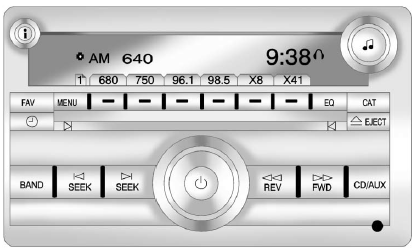
Radio with CD, Radio with CD/USB Similar
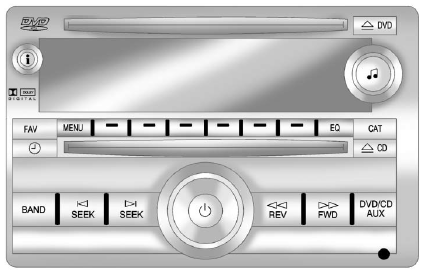
Radio with CD, DVD, and USB Port
The Buick Enclave may be equipped with one of these radio configurations, depending on the audio package and entertainment features installed in the vehicle. Each system is designed to provide convenient control of radio listening, disc playback, USB-supported media, and available rear-seat entertainment functions.
Radios with CD, DVD, and USB
Radio systems that include CD, DVD, and USB capability are paired with the Bose® Surround Sound System. This premium audio arrangement is engineered to deliver a more immersive cabin sound experience, with speaker adjustment functions explained later in this section under “Adjusting the Speakers (Balance/Fade).”
If the Buick Enclave is equipped with the Rear Seat Entertainment (RSE) system, the vehicle uses the radio configuration with CD, DVD, and USB support. This setup allows the front audio controls and rear entertainment features to work together, giving passengers access to media playback while maintaining driver control over the system.
See Rear Seat Entertainment (RSE) System for more information on the RSE system.
The DVD player is located in the upper slot on the radio faceplate. This player can read DTS-programmed DVD Audio or DVD Video media. DTS and DTS Digital Surround are registered trademarks of Digital Theater Systems, Inc.
Manufactured under license from Dolby Laboratories. Dolby and the double-D symbol are trademarks of Dolby Laboratories.
Playing the Radio
 (Power/Volume): Press this control to turn the audio system on or off. Rotate the knob to raise or lower the volume to the desired listening level.
For vehicles equipped with a Rear Seat Entertainment (RSE) System, press and hold this control for more than two seconds to turn off the entire radio and RSE system. Holding the control also activates the parental control feature. When parental control is active, rear seat passengers are prevented from operating the Rear Seat Audio (RSA) system or using the remote control.
► A lock symbol appears next to the clock display while the parental control feature is active.
This feature remains enabled until O is pressed and held again for more than two seconds, or until the driver turns the ignition off and exits the Buick Enclave.
 (Information): Press this button to switch the display between the radio station frequency and the time.
When the ignition is in the OFF position, press
to show the current time on the radio display.
For vehicles equipped with XM, MP3, WMA, or RDS features, press
to view additional text information related to the current FM-RDS or XM station, or to the CD, MP3, or WMA track currently being played.
When information is available during XM, CD, MP3, or WMA playback, the song title appears on the top line of the display and the artist information appears on the bottom line. If no text data is available for the current selection, “NO INFO” is shown instead.
Auto Text (Satellite Radio Service, CD, MP3, and WMA features):
When extra song or program details are available for the current audio selection, Auto Text can automatically page or scroll that information across the radio display. The information appears above the FAV preset area and updates approximately every five seconds, allowing longer titles, artist names, or related media details to be viewed without manually changing the display.
To activate Auto Text:
1. Press MENU to open the radio setup menu.
2. Press the softkey located under the AUTO TXT tab on the radio display.
3. Press the softkey located under the ON tab on the radio display.
If is pressed and the song title or artist information is longer than the display can show at one time, the remaining text will page every five seconds when Auto Text is activated.
Speed Compensated Volume (SCV): The Speed Compensated Volume feature automatically adjusts the radio volume to help offset changes in road and wind noise as the vehicle increases or decreases speed. In normal driving, the cabin of the Buick Enclave may become louder at higher speeds, especially on highways. SCV helps maintain a more consistent listening level without requiring frequent manual volume adjustments from the driver.
To activate SCV:
1. Set the radio volume to a comfortable listening level.
2. Press the MENU button to open the radio setup menu.
3. Press the softkey located under the AUTO VOLUM (automatic volume) tab on the radio display.
4. Press the softkey located under the desired Speed Compensated Volume setting: OFF, Low, Med, or High. This selects how much the radio volume will be compensated as driving speed changes.
Press the softkey below the BACK tab on the MENU SETUP display to return to the previous screen, or allow the display to time out after approximately 10 seconds. A higher SCV setting provides a stronger level of automatic volume compensation at faster vehicle speeds, while lower settings apply a more subtle adjustment.
Setting the Tone (Bass/Midrange/Treble)
BASS/MID/TREB (Bass, Midrange, or Treble): These settings allow the driver to fine-tune the sound character of the audio system in the Buick Enclave. Bass adjusts the low-frequency depth, midrange affects the body of voices and instruments, and treble controls the clarity of higher tones.
To adjust bass, midrange, or treble:
1. Press  until the tone control tabs appear on the radio display.
2. Continue pressing  to highlight the desired tab, or press the softkey located directly under that tab.
3. To adjust the highlighted setting, use one of the following methods until the preferred level is reached:
► Turn  clockwise or counterclockwise.
► Press  REV.
REV.
If a radio station has a weak signal, or if static is noticeable during playback, reducing the treble may help make the sound less sharp and easier to listen to.
To quickly return bass, midrange, or treble to the center position, press and hold the softkey under the BASS, MID, or TREB tab for more than two seconds. A beep sounds to confirm the change, and the selected level moves back to the middle position.
To quickly return all tone and speaker controls to their center positions, press
for more than two seconds until a beep sounds.
EQ (Equalization): Press this control to choose preset bass and treble settings matched to different listening styles. Available choices may include pop, rock, country, talk, jazz, and classical. These presets provide a quick way to change the sound without manually adjusting each tone setting.
Selecting MANUAL, or changing the bass or treble level manually, returns the EQ setting to the manual bass and treble configuration.
Unique EQ settings can be stored for each audio source. This allows the Buick Enclave radio to keep separate sound preferences for different playback modes, such as radio, CD, or other supported media sources.
If the radio is equipped with a Bose® audio system, the available EQ settings are MANUAL or TALK.
Adjusting the Speakers (Balance/Fade)
BAL/FADE (Balance/Fade): Balance and fade settings control where the sound is focused inside the cabin. Balance moves the sound emphasis between the left and right speakers, while fade shifts the sound toward the front or rear speakers.
To adjust the balance or fade:
1. Press until the speaker control tabs appear on the display.
2. Continue pressing to highlight the desired tab, or press the softkey located directly under that tab.
3. To adjust the highlighted setting, use one of the following methods until the preferred speaker level is reached:
► Turn clockwise or counterclockwise.
► Press  REV.
REV.
To quickly return balance or fade to the center position, press and hold the softkey under the BAL or FADE tab for more than two seconds. A beep sounds, and the selected level returns to the middle position.
To quickly return all speaker and tone controls to their center positions, press
for more than two seconds until a beep sounds.
Radios with CD and DVD may handle fade differently depending on the type of DVD media being played:
► With DVD-A 5.1 Surround media, the left front and right front speakers fade rearward first. The center front speakers remain unaffected until the final fade step, at which point all front speakers are muted.
► With DVD-V 5.1 Surround media, surround sound is maintained until Step 4 of the fade control is reached while fading rearward. At that point, the audio system changes output to stereo. This prevents the center channel from being lost when the fade control is moved fully toward the rear.
If the Rear Seat Audio (RSA) system is turned on, the radio disables the FADE function and mutes the rear speakers. This helps separate rear-seat audio use from the main speaker fade control in the Buick Enclave.
Radio Messages
Calibration Error: The audio system is calibrated for the vehicle at the factory. This calibration allows the radio to work correctly with the installed speakers, amplifier, and related audio equipment.
If Calibration Error appears on the display, the radio has not been configured correctly for the vehicle. In this case, the Buick Enclave should be taken to a dealer for service so the audio system can be properly checked and configured.
Locked: This message appears when the TheftLock® system has locked the radio. If this occurs, take the vehicle to your dealer for service.
If any error message appears repeatedly, or if an error cannot be corrected through normal operation, contact your dealer for further diagnosis and service.
